Organize Test Cycles in Folders
QMetry allows testers to organize and manage test cycles in a folder-structure-based hierarchy. Testers can group related test cycles and organize them systematically. For example, testers can create folders like the Regression suite, Smoke suite, and so on to group related test cycles.
Each new test cycle folder creates the next level of test cycle organization in your test cycle tree. It helps you run bulk operations like removing test cycles and copying or moving test cycles from the source folder to the destination folder.
Access the Test Cycle Organization Feature
Go to the QMetry app menu.
Select Test Management.
There are four tabs on the screen:
Test Case
Test Cycle
Test Plan
Test Report
Click the Test Cycle tab to organize test cycles in folders.
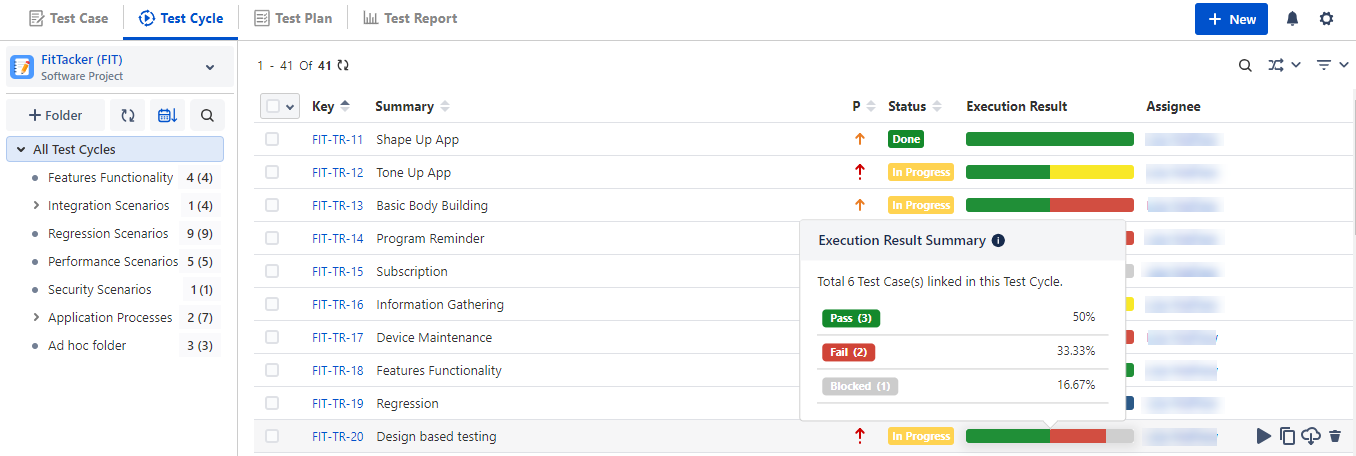
The left pane displays the folder structure of test cycles. The right pane displays all test cycles until you select a particular folder to view particular test cycles.
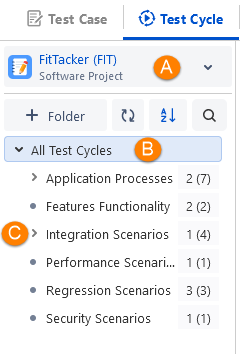
A. Project selection: By default, the project that you selected in Jira will be displayed here. You can select other projects. The folder tree is rendered in accordance with the project selection.
B. Root test cycle folder: It shows all the test cycles created within the project, irrespective of the folder within which it is created.
C. Subfolders: Folders under the root folder.
Create Test Folders or Sub Folders
Right-click on the folder and select Add Subfolder. Enter the folder name and submit. The process creates a subfolder under the selected folder, adding a new folder to the tree on the sub-level hierarchy.
Add Folder
Follow either of the following ways to add a new folder under the root or a subfolder.
A. Right-click on the folder under which you want to create a new folder and select Add Folder.
B. Select the folder under which you want to create a new folder and click the + Folder button above the tree.
The Add New Folder dialog appears.
Enter Folder Name and Description, select/change the Parent Folder Path, and click Submit. It creates a sub-folder under the selected folder.
Note
Two folders with the same name in the same level of a hierarchy are not allowed. However, you can use the same folder name at different levels or in different hierarchies.
Create another: Select the checkbox to keep the Add New Folder dialog open to continue adding folders.
Folder Hierarchy View
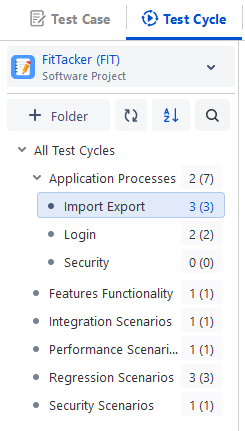
You can view the details about the number of test cycles within the current folder and the total test cycles, including test cycles of sub-folders.
The syntax of the folder hierarchy represents -
<folder name> No. of test cycles within the current folder (Total no. of test cycles, including test cycles of sub-folders)
Show or Hide Child Test Cycles from Sub Folders
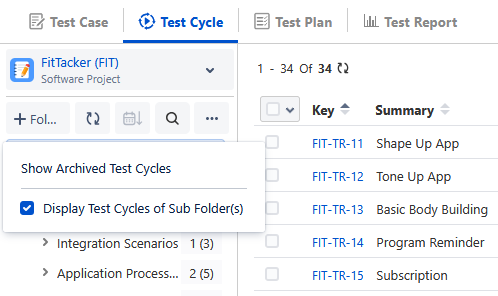
You can opt to show or hide test cycles from subfolders in the parent folder. By default, the Display Test Cycles of Sub Folder(s) option remains disabled for new projects and new users. The test cycles from subfolders remain hidden at the parent folder level on the test cycle list view. To display the child test cycles, click the More options menu on the test cycle tree and select Display Test Cycles of Sub Folder(s). The set preference is applied to all the screens from where the test cycle module list opens.
Rearrange/Sort Folders
You can arrange test cycle folders by Name and Date. Click the Sort by drop-down list and select the option to arrange the folders in the tree. You can sort the folders alphabetically and by date of creation in ascending or descending order. By default, folders are sorted on Oldest First.
Edit Folder Name
Right-click on any folder and select Edit Folder. It allows you to edit the name of the selected folder and change the description.
Note
Two folders with the same name in the same level of a hierarchy are not allowed. However, you can use the same folder name at different levels or in different hierarchies.
Cut and Paste Folder
Cut & Paste: You can also cut a folder and paste it to another location or folder in the tree to change the hierarchy. All the test cycles under the folder will also move along with the folder.
Select the folder under which you want to paste the folder you cut above.
When you paste a folder with the same name as an existing folder at the same level, the suffix “Copy (n)” will automatically appended to the new folder's name to avoid conflicts. Where “n” is a number that increments with each additional copy.
Delete Folders
Right-click on any folder and select Delete. Select the option to delete that particular folder. All the test cycles under that folder will be disassociated with the folder. If there are sub-folders under the folder, then all these sub-folders will be deleted. All the test cycles under such folders will be disassociated from the folders.
On clicking Delete, you are asked to select a folder in which they want to move the underlying test cycles.
If a folder is not selected, then the test cycles will be moved to the root folder, that is, the "All Test Cycles" folder.
Copy Folder Path
The Copy Folder Path right click option copies the folder path on the clipboard.
Copy Folder Link
You can share a specific Test Cycle folder by sharing the folder link with other users. The link is accessible to others users within the project. Users with whom the link is shared can open the folder link and directly go to the folder. Users can access the folder and its data. If it is a parent folder/root folder, the data is displayed accordingly.
For example, in a project, Project Managers, Developers, and other teams are working in collaboration with each other. They also create test assets, like test cycles required for the project. They prefer to have a direct folder link and share it across teams for the ease of adding test cycles to it.
To copy the folder link,
Right-click the folder and select the Copy Folder Link option. The link is copied to the clipboard.
Share this link with other users through the channel accessible to them. For example, you can paste the copied folder link in the email. The email recipient can then directly go to the folder and start working on it.
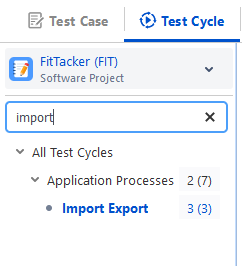
Search Folders
You can search folders on the folder structure through the search box. It is useful where the folder structure is very complex with multiple hierarchies or the folder list is too long to locate a specific folder.
All Test Cycles (Root Folder)
You can perform the following operations on the root folder:
Add Subfolder
Paste the copied folder
Copy Folder Path
Copy Folder Link
You can not perform other operations on the root folder that are available on subfolders like edit, delete, cut, copy, and so on.
From the root folder, you can perform only Reuse action (and not Move action) for test cycles as the test cycles remain on the root folder and are not moved.
Bulk Operations
The options for carrying out Bulk Operation remain invisible by default. The options available for Bulk Operations become visible on the screen when you select at least one record.
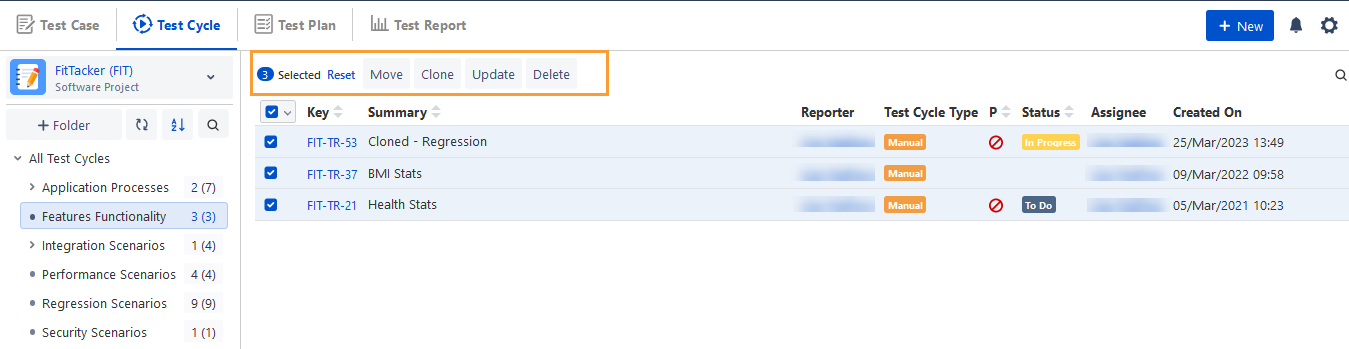
You can perform the following Bulk Operations on test cycles. Follow the links for more details.
Move Test Cycles
Edit Test Cycles
Delete Test Cycles
Move and Re-order Folders
You can reorder or move folders within the folder hierarchy using the drag-and-drop functionality across all modules. Refer to Moving and Reordering Folders for more information.