Bulk Clone Test Cases
Apart from cloning single test cases, you can clone multiple test cases in bulk at once. The feature is helpful in scenarios where the testing team needs to use the same set of test cases with minor changes to them. For example, the testing team has to run application tests on different devices. The test cases authored for one device can be used for other devices with some modifications.
Note
A maximum of 100 test cases can be cloned at once.
Perform the following steps to clone test cases in bulk:
On the folder tree, select the source folder where the test cases are located.
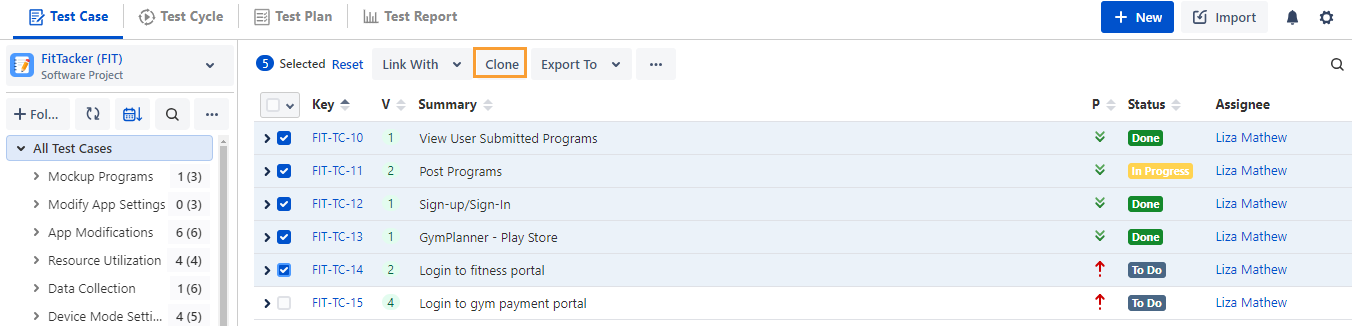
Select the test cases you want to copy using the clone function.
Selection of Multiple entities at a time: To select entities in a range on the current page, select the first entity's checkbox, then select the last entity's checkbox, and simultaneously hold the keyboard's SHIFT key. All the entities between these two entities will get auto-selected.
Select All:
Select all records on the current page: Clicking on the check box in the column header only selects all the records on the current page.
Alternatively, open the check box drop-down and select Current Page.
Select all records across all pages: Open the check box drop-down and select the Across All Pages option.
Once you select the test cases that you want to clone, the options for bulk operation become visible on the screen.
Click Clone.
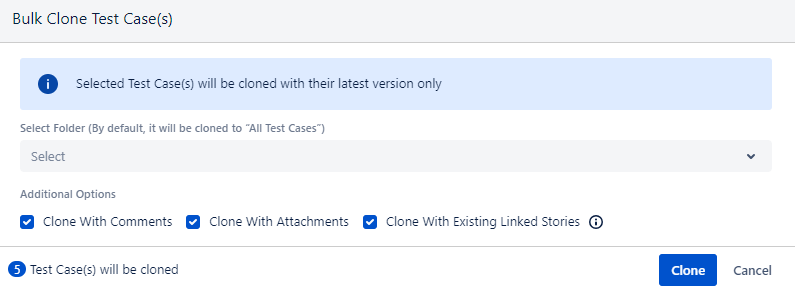
The Bulk Clone Test Cases screen appears.
Note
Test cases are cloned with their latest version only.
Select Target Folder: Select the folder where you want to create the cloned test cases. By default, it will be cloned to All Test Cases folder.
Clone with Comments: Select to clone test cases with existing comments.
Clone with Attachments: Select to clone test cases with attachments added to test cases as well as test steps.
Clone with Linked Story: Select the option to preserve the linkage with associated stories, which helps maintain traceability.
Required Permissions: You must have the Requirement Edit, Test Case Create, and Test Case Edit permissions to clone a test case with linked stories.
Note
A maximum of 100 story linkages for individual test cases will be preserved when cloning test cases in bulk. If any of the test cases has more than 100 linked stories, it will be cloned without story linkages. The story linkages for that test case will be skipped. Such test cases will be displayed in the Notification section along with the cloning status.
Click Clone to start the cloning process.
You can see the test cases are cloned with the “Cloned” prefix in the selected destination folder.