General Configuration for Paging
Paging
The Global Paging Settings feature enables administrators to set at the instance level. This setting applies to all users, both new and existing.
By default, the global settings affect only new users. For example, if the Page Limit is set to 20, new users will see 20 records per page unless they change it under their personal settings.
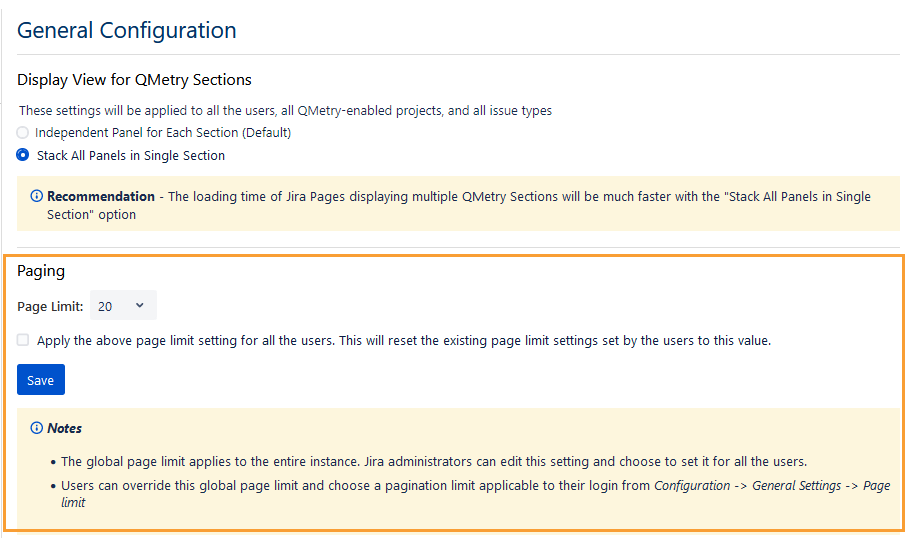
To apply the same pagination setting to all existing users, select Apply the above page limit setting for all the users. This will reset the existing page limit settings set by the users to this value checkbox. This action overrides any pagination values previously configured by users in General Settings and resets them to the specified global value.
Note
The global page limit applies to the entire Jira instance. Users with both Administer Projects and Browse Projects permissions for the project can edit this setting and apply it for all users.
Users can override the global page limit by setting a custom pagination limit for their login under Configuration > General Settings > Page Limit. Refer to General Settings.
Perform the following steps to configure the pagination limit:
Go to Administration and select Manage apps.
Select Global Settings under QTM4J on the navigation bar.
The Global Settings screen appears.
An admin can set the Page Limit, which defines the number of records displayed on a single page. Select a value from the Page Limit drop-down list.
To override the pagination settings defined by individual users, select the checkbox. Leave it cleared to allow users to manage their own pagination preferences.
Click Save to save the settings.
Note
The Display View for QMetry Sections on the screen is available from QTM4J v4.6.1 onwards.
If you choose to apply the settings for all users, a confirmation message appears.
Click Change to proceed.