Test Execution Reports
Introduction
The Test Execution report helps the testing team, the project manager, and the product owner to understand the status of the testing and the overall stability of the application. The report enables the user to get a detailed understanding of the status of the Test Case within a single or multiple Test Cycles. The report allows the user to view the executions, graphically or in tabular format.
Test Execution Reports can be shared and discussed during retrospective as it contains detailed test execution status. The report can help organization visualize their current quality and plan ahead QA and Development activities timely.
For the selected Project, the Test Execution Report shows how many tests were run over a period of Time, Sprint or Version. The report displays the overall progress of test executions.
Perform the following steps to view Test Execution Reports:
Go to QMetry menu, select Test Management and click the Test Report tab.
On the Test Report window expand Test Execution Reports
You can drill down to see the following reports
Test Case Execution Summary
Overall Effort Summary
Effort Summary By Execution Assignee
QMetry allows users to configure and generate a customized report to retrieve the details with a variety of customization. For further details on how to configure and generate reports browse through Configure and Generate Report and View Report.
If custom fields exist in test execution, then the export of Test Execution Reports will also contain custom field details.
The different options available to generate the Test Execution Report are mentioned below:
Test Case Execution Report
The Test Case Execution report helps the testing team, the project manager, and the product owner understand the status of testing, quality, and stability of the product. The report shows the count of test cases passed, blocked, failed, not executed, etc. The report can be grouped on the following mentioned parameters.
By Project
By Test Cycle
By Environment
By Build
By Execution Assignee
By Label
By Component
By Test Case Type
By Requirement
By Time Frame: The report displays the count of test cycle executions performed in a Project(s) during the defined time frame of Daily, Weekly, Monthly, and Yearly. In addition to the specified number of days, you can define time frames using custom date ranges and operators like =, >, <, <=,>=. The options to select a time period depend upon the frequency you select to generate the report. The following table displays the maximum duration set to generate the report.
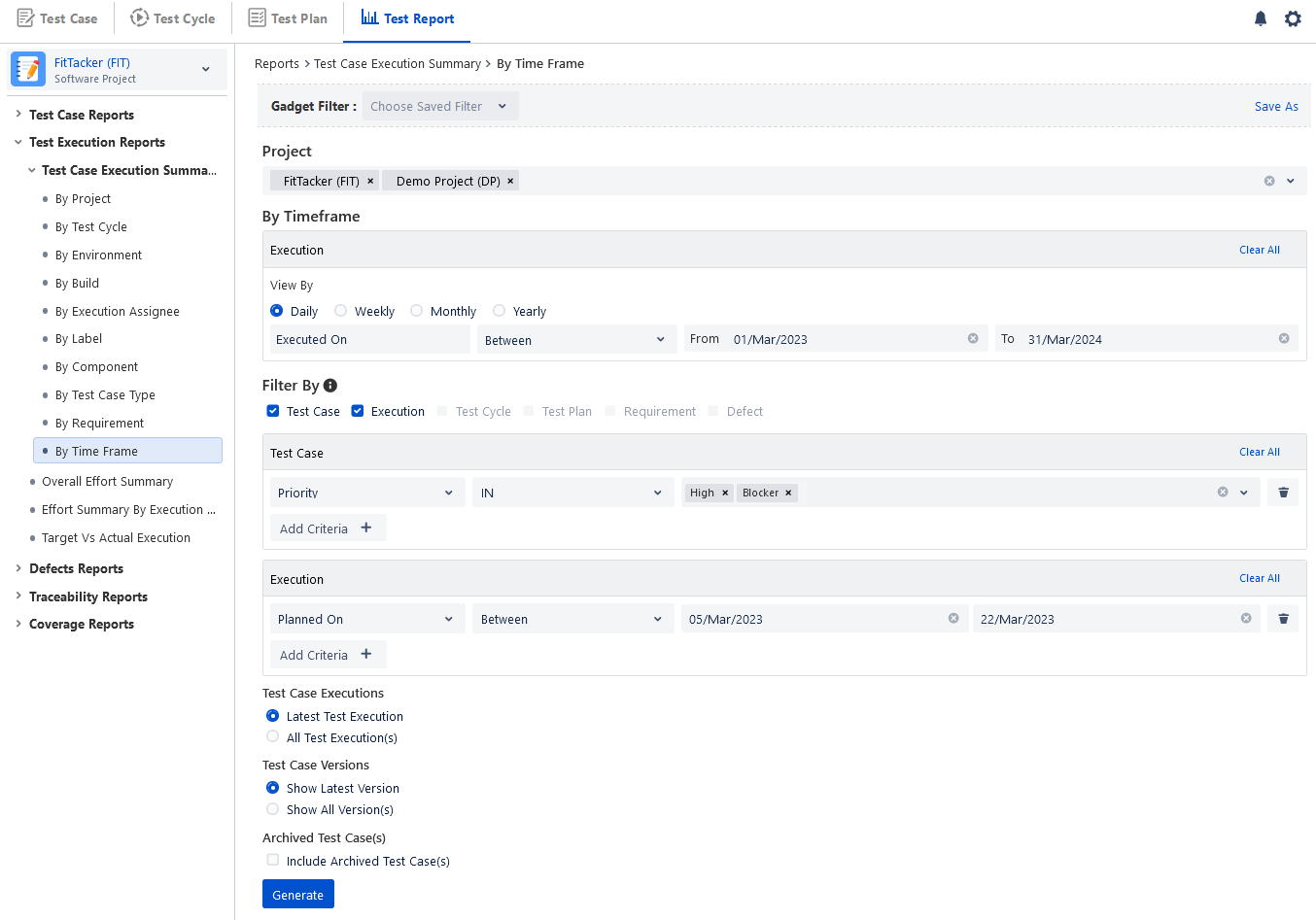
Once the Test Case Execution Report is configured and generated.
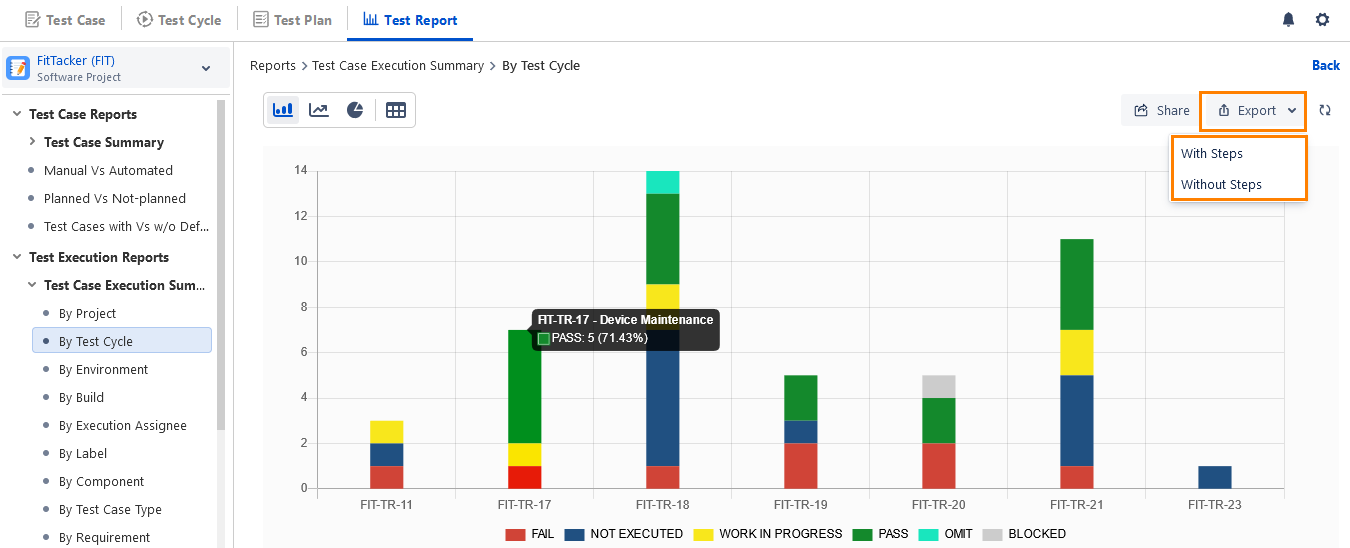
For example, a QA Manager wants to view Test Case Execution summary By Test Cycle.
The bar graph displays the test cycle summary, test case count, and corresponding percentage on hover. Test Case Execution Report can be generated in bar chart, line chart, pie chart and table formats. Users can export the report into Excel using the Export option and share it.
Test Execution Summary can be exported using the following options:
With steps: The exported report contains all Test Steps for all Test Cases in the selected Test Cycle. The test report displays the execution details of the test steps in the Test Case Execution report. Test Step Parameter Group, Test Step Summary, Test Step Data, Test Step Expected Result, Test Step Actual Result, Test Case/Test Step Execution Result, Test Case/Test Step Execution Comment will be displayed along with all available columns for the report.
Without steps: The exported report contains only the list of Test Cases in the selected Test Cycle.
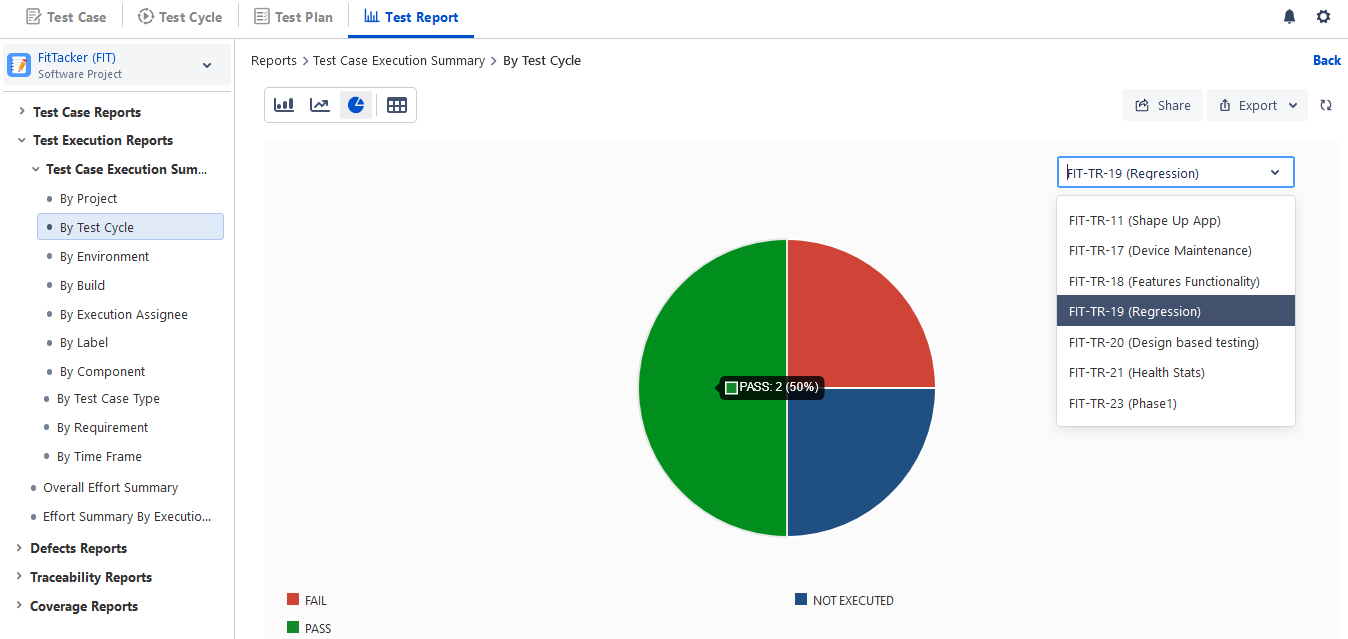
The pie chart displays a drop-down menu with values appropriate to the grouping of Test Case Execution Summary report. For example, for Test Case Execution Summary By Test Cycle the pie chart shows the drop-down menu with the test cycles that are covered in the report. The same way, the pie chart report for Test Case Execution Summary By Build will show the drop-down menu with builds that are considered in generating the report.
The tabular view displays the test execution summary in a two-dimensional view that includes the count of the executed test cases and the percentage. Users can click on the Test Cycle Key to view the test cycle details.
Overall Effort Summary
The report provides a comparison between the Estimated Time for test case execution vs. the Actual Time taken for test case execution. The Overall Effort Summary Report would help the user to make sure that the tasks are being completed in a set amount of time; through which the user will be able to understand the lag,
Once the Overall Effort Summary is configured and generated.
The report can be viewed in three distinct graphs: Bar Chart, Line Chart and Pie Chart.
Also, a tabular form can be used to represent the data.
Users can export the report into Excel using the Export option and share it. There are two options for export:
With steps: The exported report contains all Test Steps for all Test Cases. The test report displays the execution details of the test steps in the Test Case Execution report. Test Step Parameter Group, Test Step Summary, Test Step Data, Test Step Expected Result, Test Step Actual Result, Test Case/Test Step Execution Result, Test Case/Test Step Execution Comment will be displayed along with all available columns for the report.
Without steps: The exported report contains only the list of Test Cases.
Effort Summary By Execution Assignee
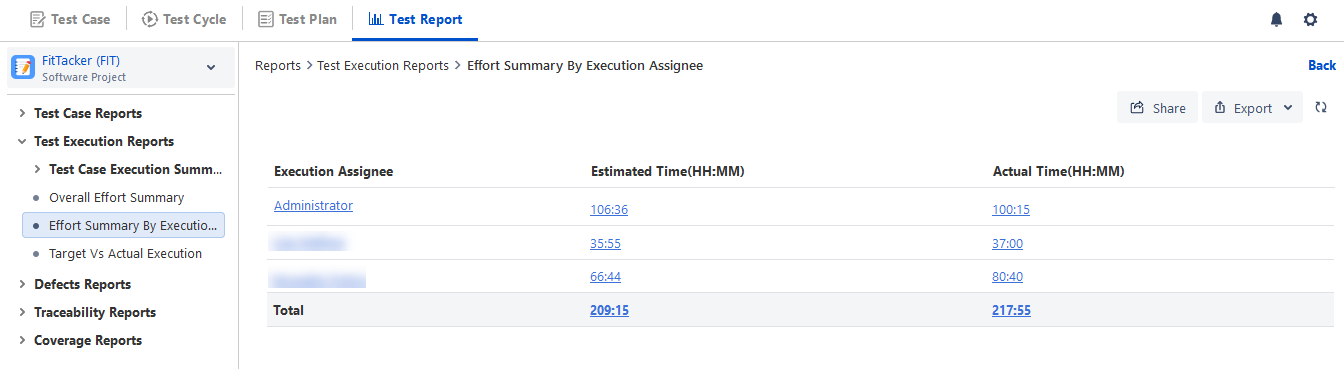
The report displays Execution Assignee wise summary of Estimated Time vs. Actual Time of test case execution. It shows the actual time taken by the Assignee to whom the test case was assigned for execution. If the user wishes to get the overall efficiency in terms of effort put on by an individual assignee for a given execution, the user can make use of the Effort Summary By Execution Assignee.
Once the Effort Summary By Execution Assignee is configured and generated.
Users can export the report into Excel using the Export option and share it. There are two options for export:
With steps: The exported report contains all Test Steps based on the execution assignee. The test report displays the execution details of the test steps in the Test Case Execution report. Test Step Parameter Group, Test Step Summary, Test Step Data, Test Step Expected Result, Test Step Actual Result, Test Case/Test Step Execution Result, Test Case/Test Step Execution Comment will be displayed along with all available columns for the report.
Without steps: The exported report contains only the list of Test Cases based on the execution assignee.
Target vs Actual Test Execution
Refer to Target vs Actual Test Execution.
Note
If the number of records in the report exceeds 1000, the report will not be downloaded directly. Instead, it will be sent to the registered email address.