Delete Test Cases
Note
To delete a test case, you must follow a two-step process: archive it and then delete it. Make sure you archive the test case before proceeding with deletion. Refer to Archive Test Cases for details on archiving test cases.
You can delete individual test cases one by one or multiple test cases in bulk at once. QMetry Test Management for Jira allows you to maintain different versions of test cases. You can also delete a particular test case version. You can use the inline delete feature to delete individual test cases.
Steps to Delete a Test Case
Archive the Test Case:
All versions of the test case will be archived. This action will prepare the test case for deletion.
Delete the Test Case:
This will permanently delete the test case, including all its archived versions.
Warning
Deleting the test cases will permanently remove them from the project, and this action cannot be reverted.
Delete a Single Test Case
Perform the following steps to delete a single archived test case.
On the folder tree, click the More icon and select Show Archived Test Cases.
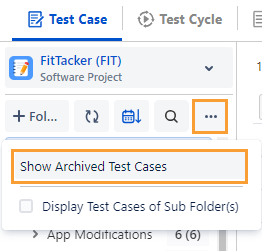
The archived test cases are displayed on the screen.
Hover over the archived test case that you want to delete.
Click the Delete icon for the test case.

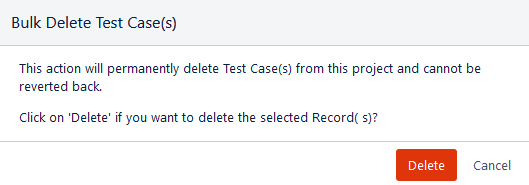
The confirmation message appears.
Click Delete to proceed.
Delete Test Cases in Bulk
You can remove multiple test cases at a time through the Bulk Delete functionality. Bulk Delete will delete all versions of the selected test cases.
For example, the QA Manager finds a bunch of test cases that are not relevant to the planned release. Hence, they archive such test cases and apply the Bulk Delete operation.
Note
A Maximum of 1000 test cases can be deleted in bulk at a time.
Perform the following steps to delete test cases in bulk:
On the folder tree, click the More icon and select Show Archived Test Cases.
Select the test cases that you want to delete.
Selection of Multiple entities at a time: To select entities within a range on the current page, select the first entity’s check box and then select the last entity’s check box, and simultaneously hold the SHIFT key of the keyboard. All the entities between these two entities will get auto-selected.
Select All:
Select all records on the current page: Clicking on the check box in the column header selects all the records on the current page only. An alternate way is to open the check box drop-down and select Current Page.
Select all records across all pages: Open the check box drop-down and select the Across All Pages option.
Once you select the test cases that you want to delete, the Delete and Unarchive buttons become visible on the screen.
Click Delete.

The confirmation message appears.
Click Delete to proceed with the deletion of selected test cases.