Archive Test Cases
You must archive test cases before deleting them. The Archive Testcases feature helps prevent accidental deletion, so you can delete test cases only after archiving them. You can archive test cases that are no longer in use to remove them from the active test case list. Archiving moves unwanted test cases out of view without permanently deleting them.
You can unarchive test cases at any time to return them to the active list. If you no longer need them, you can delete the archived test cases.
Note
A maximum of ten filters, including system and custom fields, can be selected at a time.
Impact of archiving test cases:
All the versions of the test case will be archived.
All existing folder associations will be lost.
The existing execution of the selected test cases, along with attachments, will be preserved.
Note
Required Permission: You must have the Test Case Edit permission to archive test cases.
Other Points:
The Test Report configuration screen provides the Archived Test Cases filter. Select this filter if you want to include archived test cases in the report.
In Traceability Reports, the system displays archived test cases with the Archived tag.
If Automation creates a test case and you later archive it, importing a result file containing the same test case will create a new one.
When importing test cases by mapping the Key, the system does not map archived test case keys. As a result, it skips archived test cases during import, and they are not imported.
If you export test cases using the With All Execution option, both archived and unarchived test cases will be included in the export.
If an archived test case is linked to a story, you cannot modify the test case or perform any operations on it.
You can archive a single test case and bulk test cases.
Archive a Single Test Case
Hover over the test case that you want to archive and click the Archive icon.
Or, click the Archive icon on the test case details page.
Archive Bulk Test Cases
You can archive multiple test cases in bulk at a time.
Perform the following steps to archive bulk test cases:
On the folder tree at the left, select the source folder where the test cases are located.
Select test cases that you want to archive.
If the Display Test Cases of Sub Folder(s) option is enabled on the tree, then the screen at right will include test cases of parent folder as well as its sub-folders. So, make sure you select only the required test cases.
Selection of Multiple entities at a time: To select entities within a range on the current page, select the first entity’s check box and then select the last entity’s check box, and simultaneously hold the SHIFT key of the keyboard. All the entities between these two entities will get auto-selected.
Select All:
Select all records on the current page: Clicking on the check box in the column header selects all the records on the current page only. An alternate way is to open the check box drop-down and select Current Page.
Select all records across all pages: Open the check box drop-down and select Across All Pages option.
Once you select the test cases that you want to archive, the options for bulk operation become visible on the screen.
Click the More button and click the Archive option.
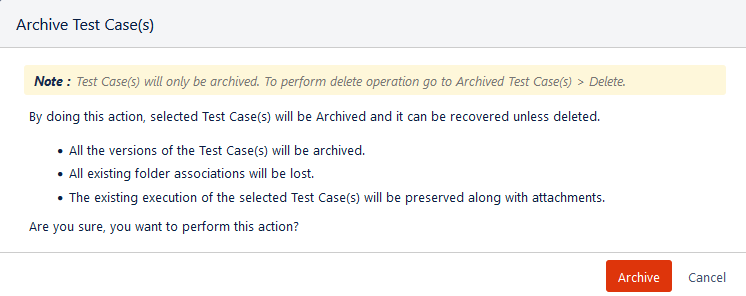
The Archive Test Cases dialog appears.
Click Archive to archive the selected test cases.
The Audit Logs tab for the test case displays the folder association details if the archived test case was associated with folders.
Filter Archived Test Cases
To view only archived test cases on the list, open the more icon above the folder tree and click on the Show Archived Test Cases option.
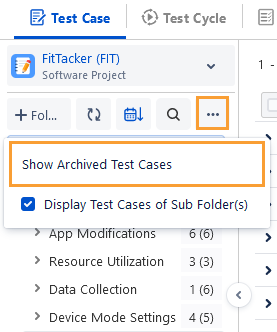
The screen displays all the archived test cases.
You can either unarchive or delete the archived test cases.
Delete: It deletes the test case permanently.
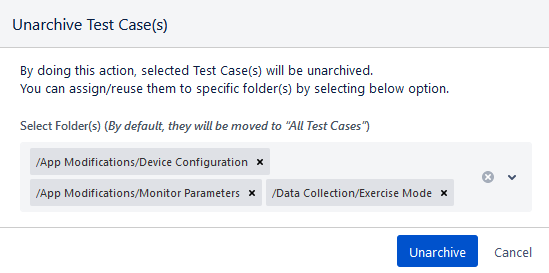
Unarchive: It makes the archived test cases active. You can place the unarchived test case in specific folders by selecting the folders. By default, the unarchived test cases will be moved to All Test Cases (root folder).
Test Cases Tab in Test Cycle
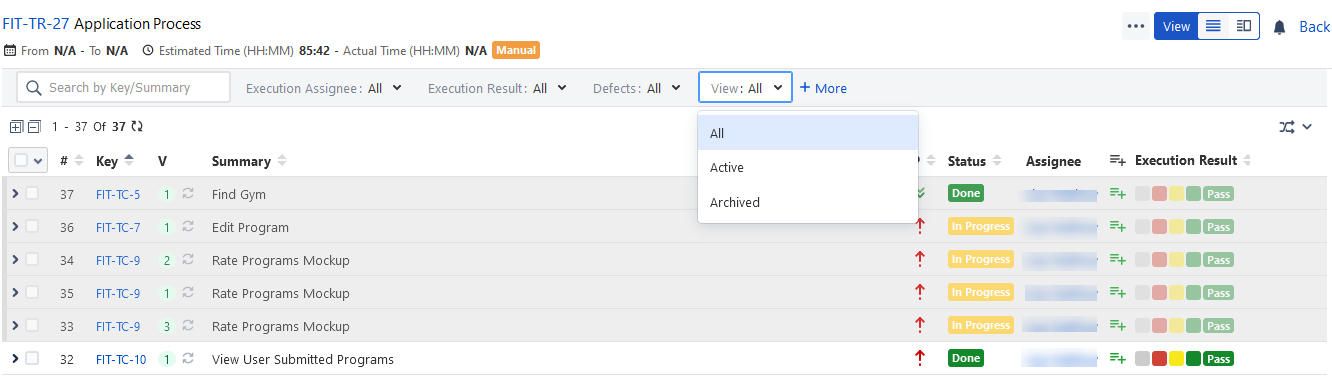
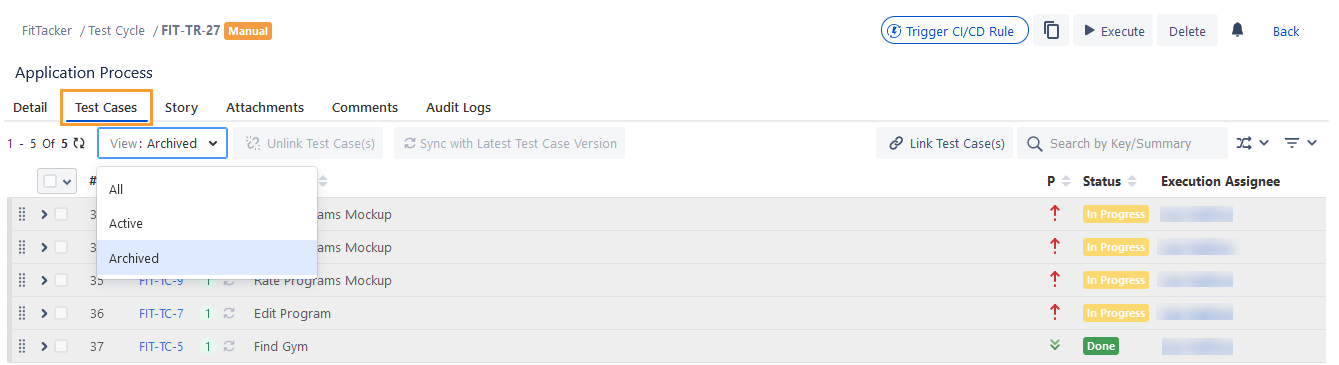
You can apply All, Active, and Archived filters to view the test cases accordingly.
The archived test cases are displayed in disabled mode. You can still unlink test cases from the test cycle. You can not perform any other actions on these archived test cases.
On the Execution Screen
Archived test cases will appear in Read-Only mode. You can not edit the archived test cases, execute the archived test cases, or link bugs/attachments to archived test cases.
In Grid View, archived test cases appear with the Archived tag attached to them.
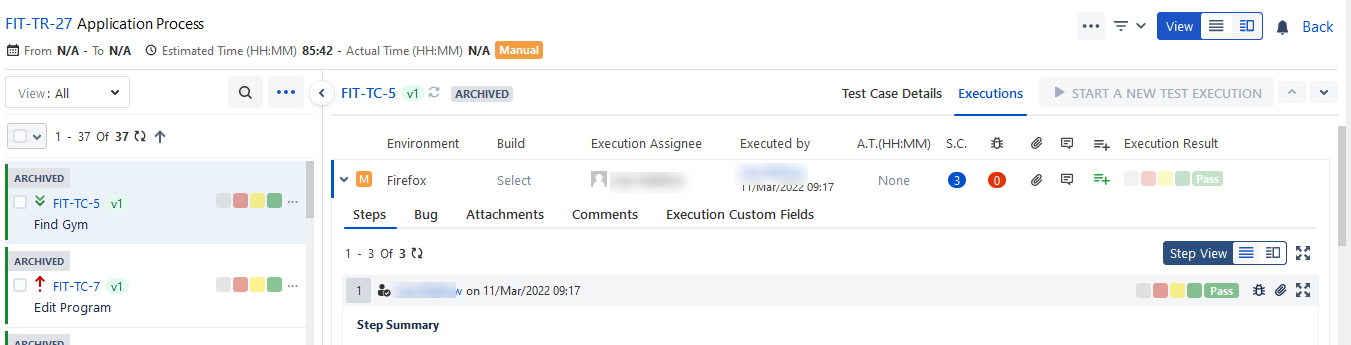
You can apply the filters of All, Unarchived, and Archived to view the test cases accordingly.
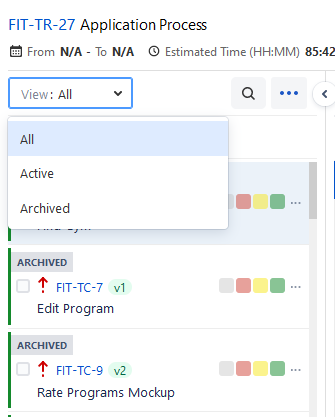
In List View, the archived test cases appear disabled on the screen. You can apply the filters of All, Unarchived, and Archived to view the test cases accordingly.