Quick Start
QMetry Test Management for Jira is designed for Agile Development and Testing teams. The goal is to bring the teams together and help them collaborate. This document highlights how agile teams with diversified and specialized roles can work together and create great software products.
Relationship between QMetry Test Management and Jira
The extensive integration between QMetry Test Management and Jira allows users to use one platform to manage both the testing and development processes.
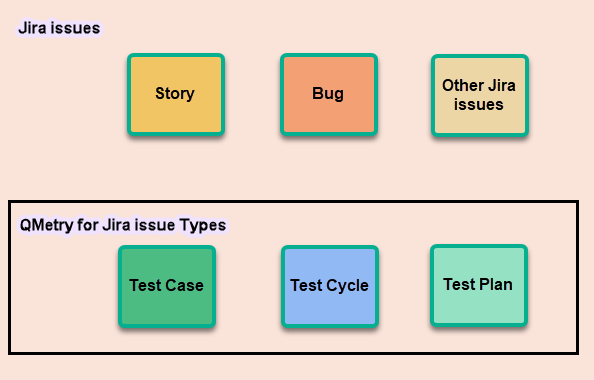
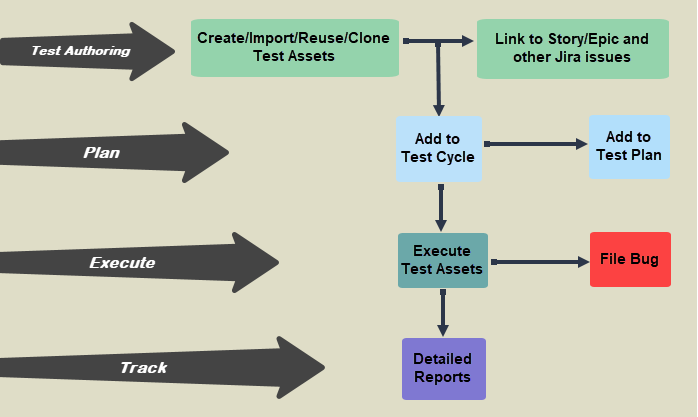
Testing process in QMetry Test Management for Jira
A constructive testing process of QMetry Test Management for Jira includes phases such as Test authoring, Test planning, Test execution, Defect analysis, Tracking of all your testing efforts, and so on.
A. Start the Testing with Test Planning: A Test Plan can be created for a Sprint, Version, Module, or Feature. Many organizations create a Test Plan before Test Authoring. Such organizations follow the following Testing Pattern:
Test Planning > Test Authoring > Test Execution > Track progress and status.
B. Start the Testing with Test Authoring: Some organizations start their Testing by defining Test cases before planning them for execution. Such organizations follow the following Testing Pattern:
Test Authoring > Test Planning > Test Execution > Track progress and status.
The following is a typical scenario where your team comprises various roles like:
Product Owner or Project Manager
Business Analyst
Developers
Manual Testers
Automation Engineers
Your goal is to build a portal that allows end-users to make a flight reservation for a reputed airline, FlyHigh. After intense market research and due diligence, Product owners and stakeholders come up with high-level requirements, which are usually treated as Epics or Stories in Jira.
In this case, the stories could be:
Story 1: As a flyer, I should be able to search for flights.
Story 2: As a flyer, I should be able to customize my journey and compare options.
Story 3: As a flyer, I should be able to enroll and benefit from the Loyalty Program.
Story 4: As a flyer, I should be able to book flights and manage my journey later.
Typically, a Product Owner or stakeholders provide these high-level requirements for teams to get started.
Tip
Best Practice Tip: Use the Test Acceptance Driven Development.
Right inside your story, you can start putting Test Acceptance criteria as shown below. Usually this is done by a Business Analyst or Lead Tester.
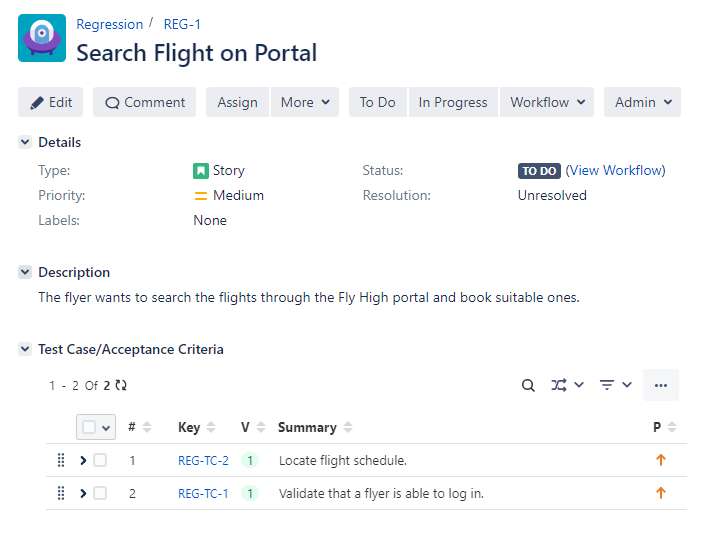
For Development teams, it is a Requirement repository with readily available standards to refer to. When validations are well-defined, it brings more clarity to developers.
Test Authoring
During the Test Authoring phase, testers create, modify, clone, import, organize, and link test cases to requirements, stories, epics, or other issue types. QMetry allows users to create a new version of the Test case instead of updating the same version. In the version control section, you will see how test case versioning helps create an effective testing process.
Continuing the above example, the written Test Cases build up common ground between developers and testers. If done right, Test Authoring can improve visibility, ensure traceability, reduce maintenance, and lay the foundation of a comprehensive regression suite, ultimately leading to great quality products. Here are some of our recommendations on Test Authoring Best Practices:
Define Self-sufficient, Modular, Reusable Test Cases
The test case is the foundation unit for Test Authoring. Think of a Test Case as one single atomic activity (with a group of actions that end-users need to perform) that achieves a unique functional goal.
In the above scenario, Story 3 and Story 4 require a flyer to benefit from the Loyalty Program or create/manage bookings. Both of these stories require users to log in. A new flyer must register and log in before they can avail themselves of these features. See how you can design Test Artifacts.
Test Cases of Story 3 related to the Loyalty Program would look like this.
Test Case 1: Validate that a flyer is able to log in.
Test Case 2: Flyer should be able to review Loyalty Program benefits after login
Test Case 3: Flyer can encash Loyalty Program benefits once he earns above 500 points.
Test Cases of Story 4 related to bookings would look like this.
Test Case 1: Validate that a flyer is able to log in.
Test Case 2: Search for flights
Test Case 3: Make a payment.
Test Case 4: View Reservation.
Note that Test Case 1, related to login, is common in both stories. Reusing this test case would improve efficiency and reduce maintenance effort.
As shown in the case above, test cases should be tied to the user's functional actions to achieve a meaningful outcome. That helps in modularity and reusability. The screenshot below shows you how to reuse this test case:
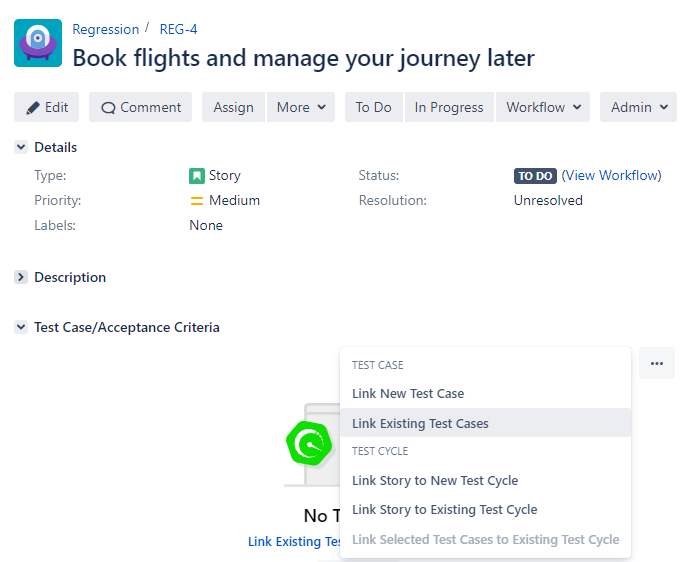
The “Validate that a flyer can log in” test case already exists for Story 3 above. You can reuse the same test case for Story 4 below. Reusing test assets in the event of repetitive user actions saves human efforts and keeps test artifacts in sync across the test documentation.
Organizing Test Case Library
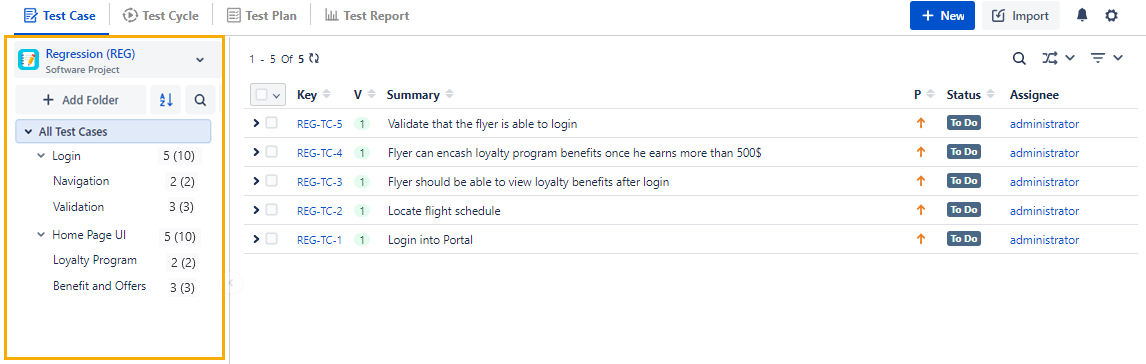
QMetry allows testers to organize and manage test cases in a Folder structure-based hierarchy. Test cases can be grouped according to test cases and organized systematically during authoring/post-authoring. A good organization of Test assets helps users find them more quickly.
Testers can create folders to group Test cases of one feature, module, or component. In QMetry, organizing test cases helps users carry out bulk operations such as associating test cases with stories and test cycles, moving/reusing them to other folders/projects, and so on. For example, you can group our FlyHigh project test cases feature-wise:
Using Custom Fields
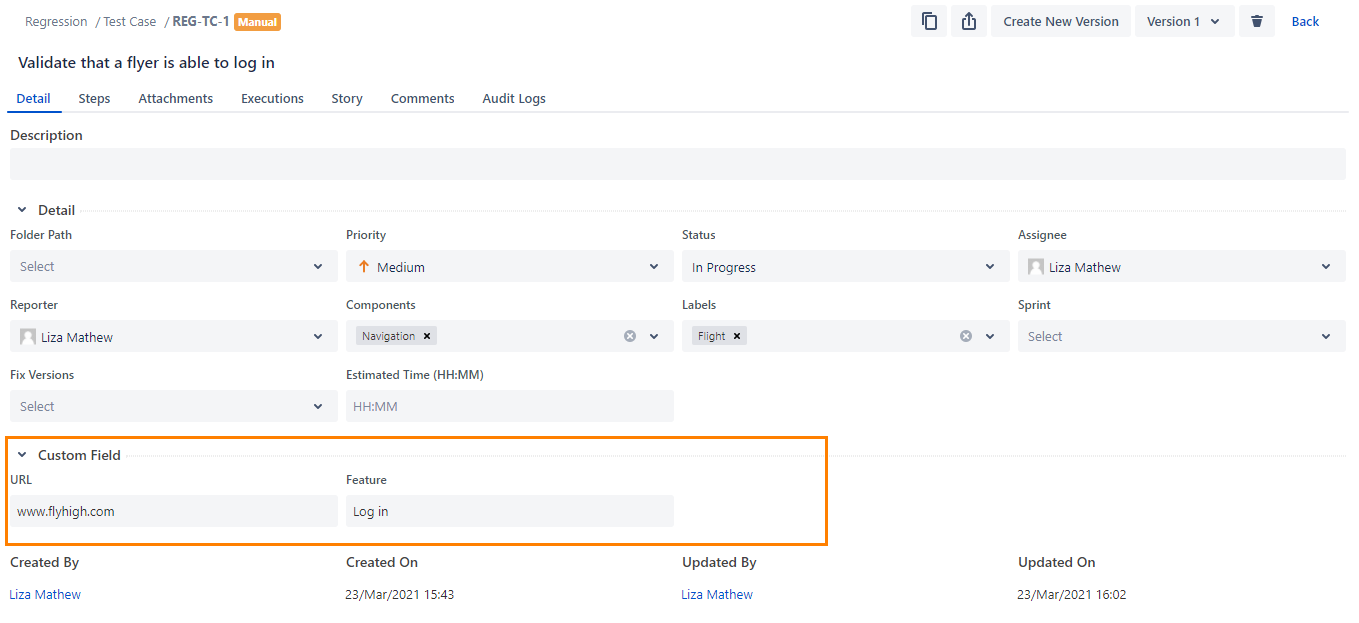
A custom field is an additional property defined for Test assets. QMetry provides most of the standard fields defined in the Testing process; however, sometimes, the stakeholders want to add custom fields to track the details at a granular level. QMetry allows QA Managers to create custom fields for Test assets to customize the entities according to their set Testing Process.
For example, in the test case, the QA manager wants to track a website's Feature and URL.
Version Controlling
QMetry offers a strong reusability concept by allowing users to create a new version of the Test Case instead of updating it.
If you work in a highly controlled environment, version control is likely important. The Test cases in the library can be updated without affecting those that are already being run. (However, QMetry does not affect the executions until the user wants to sync the changes.)
If you work in an environment where documentation and traceability are unnecessary, then version control may not be significant; however, it’s helpful to trace the history and modifications to your test artifacts.
For example, as our airline website evolved, one more parameter was added to the login page along with a username and password. So, the Tester created a new version of a Test case with an added step instead of updating the original one.

Data Parameters
When you want to cover multiple data combinations in a scenario, data parameters come into the picture. For example, when you write a test case for login.
Verify customer login
Verify employee login
Verify corporate login
The Test case is the same in these scenarios but requires different data. QMetry allows testers to create a set of Data with varying combinations using the Parameter feature.
Test Planning
A test plan serves as a road map to the testing process, with all the necessary details related to execution coverage. It allows the QA manager to estimate the required effort and cost to execute the testing process accurately.
Defining Test Plan
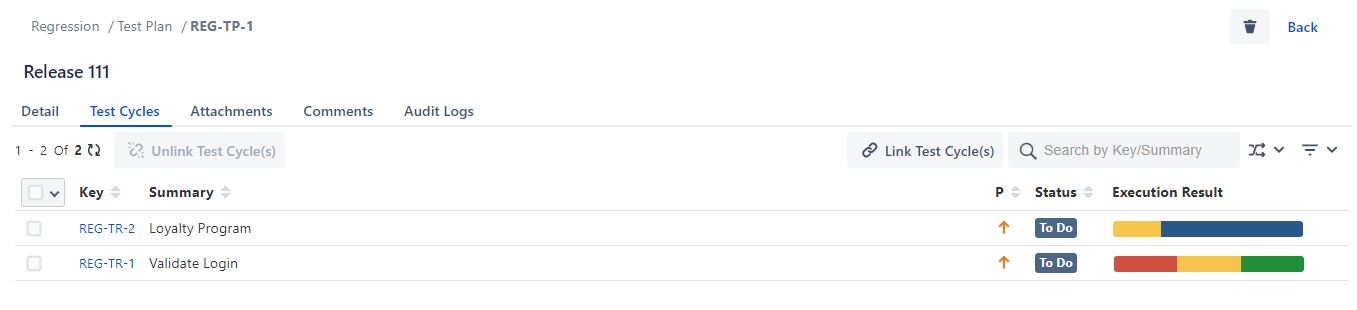
A Test Plan should define the execution coverage to verify that the product or system is developed according to its specifications and requirements. In QMetry, a Test Plan is a group of test cycles. A Test plan can be created for a particular Sprint, Version, and so on. During the planning phase, a Test plan is created, and multiple Test cycles are linked. This kind of grouping also allows easy tracking of execution progress.
Tracking Execution Progress on Test Plan
Once the test cycles are linked to the Test Plans, users can track the execution progress of all test cycles on the test plan. It allows the QA manager to get a clear vision of the efforts required for testing.
Organizing Test Plans
A test plan can be organized into folders. For example, for each Release has multiple sprints. If a Test Plan is created for a Sprint, it can be organized in its Release folder.
Test Execution
Test execution is a key phase in the Software Test Lifecycle. It refers to the execution of test cases or test plans to ensure the fulfillment of the product's pre-defined requirements. It involves executing the test and comparing expected and actual results.
Test Cycle
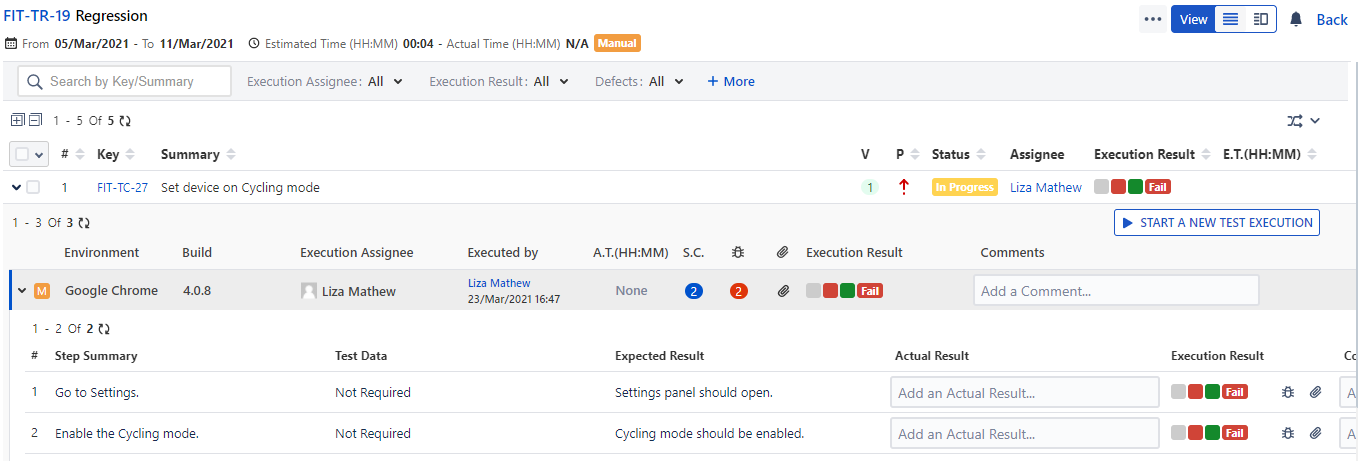
During the test execution phase, a group of Test cases is linked to the Test cycles to test them against an environment, build, and so on. The test cases are assigned to a Tester for execution. Testers can create multiple executions for multiple environments, builds, and so on. Like test cases and test cycles can also be organized in folders and can have custom fields.
A. Grid View Execution Screen
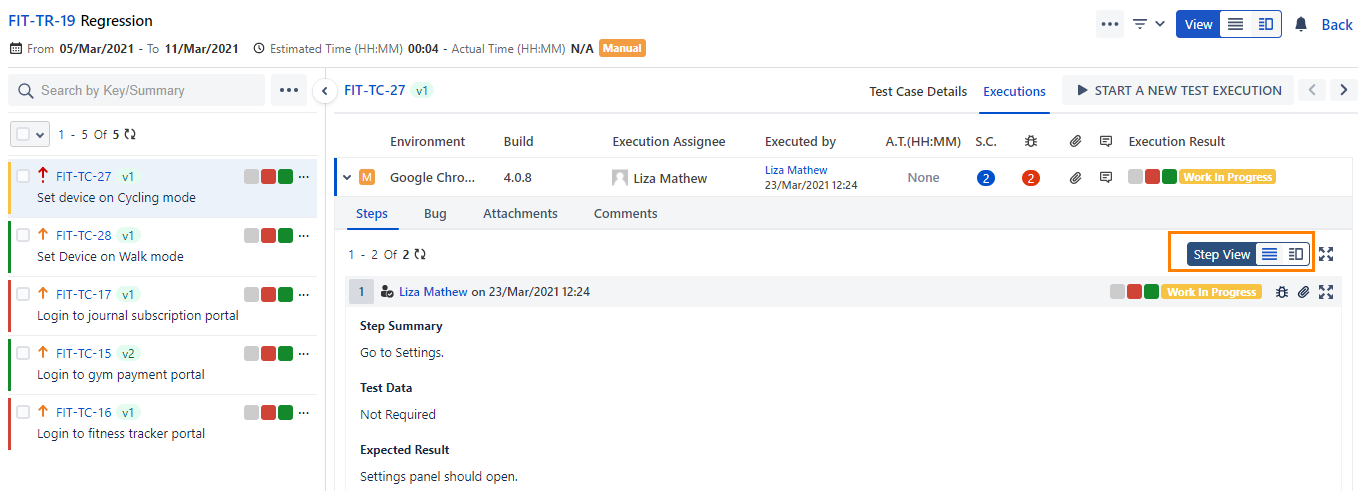
B. List View Execution Screen
Define Custom Status
As a Test Cycle can have Versions and Sprints, the custom workflow statuses can be defined to match the workflow with Jira's workflow statuses.
Tracking the Testing Progress
The concise reports of QMetry allow you to evaluate the project's current status and product quality, track manual and automation testing efforts, Traceability between Requirements and Test assets, etc. Using these reports, a QA manager can take corrective actions if necessary. QMetry provides a vast number of reports.
Automation
Like Manual Testing, QMetry supports Automated software testing extensively as it increases the depth and scope of tests to help improve software quality. Test automation can efficiently execute thousands of complex test cases during every test run, providing complete coverage with manual tests.
Consider all possible scenarios while constructing an automation script for automated test cases. Well-written manual test cases provide a strong base for automation. It also helps Automation engineers write quality code and streamline automation scripts with manual test cases.
Automation API/Maven/Jenkins
The API is designed to upload the Test execution in QMetry. If you are using any of the following QMetry-supported Automation frameworks, you can upload your execution results in QMetry using QMetry Automation.
Reusability
Automated Test cases are reused based on their Summary, Description, and Steps. Find a detailed description of how reusability works for different frameworks here.
Automation Reports
QMetry provides multiple reports for automation.
Open API
The QMetry Open API supports almost all the operations that can be done manually on QMetry UI.
Configuration
QMetry comes with pre-configuration that suits most organizations' Testing Processes, but it also allows you to configure your process. The different projects/products/software have different components, labels, priorities, environments, Execution results, workflow statuses, custom fields, and so on.
Add components, labels, priorities, environments, Execution results, and custom fields that suit your product.
Add parameters for Test cases to test the same scenario for various combinations of data sets.
Enable the Auto Update Execution Result feature to update the test case execution result automatically following a change in the test step execution result.
For quick access to execution status on the execution screen, set the preferred execution statuses.
Add custom status for the Test Cycle and Test Plan to match your sprint workflow. Not all organizations manage status for Test cases as they are meant to be reused. Test cases can have different statuses like Draft, Reviewed, Approved, and so on.
Project Permissions
The permissions restrict the unwanted use of QMetry. If the permissions are not enabled, every user can perform every operation. QMetry recommends that the permissions should at least be enabled for Modify Configuration and Delete assets.
Enable QMetry in a Project
Once QMetry is installed or any new project is created, to enable QMetry features in that project, a Project admin has to enable the QMetry app in case the team wants to use QMetry in that project.
Enabling Jira issues as Story and Defect
A project admin can decide which issue type in Jira should be considered a story or a bug. Generally, all your requirement issue types, such as Story, Epic, and Task, should be regarded as Story, and defect issue types such as Bug should be considered Bug. Other than Jira custom issue types, custom issue types can also be enabled as Story or Bug.