QMetry JQL Functions
Introduction
You can create advanced JQL filters using QMetry JQL functions and use them anywhere Jira supports JQL. In Advanced JQL Search, these functions return Jira Stories or Bugs based on the arguments you specify for QMetry test assets.
Jira stories refer to issue types configured as Story, and Jira bugs refer to issue types configured as Bug in Project Settings > QTM4J Settings > Common Settings > Issue Type.
You can save, share, and export QMetry JQL functions and use them in dashboards, Confluence, and QMetry Reports. In QMetry Reports, you can apply these functions in Defect and Requirement filters to generate reports.
Note
Users should have the Execute QMetry JQL Functions permission under Project Settings > QTM4J Settings
QMetry JQL functions and their usage
The section explains where you can access the feature in QTM4J and how to make further use of it in Jira.
From where to access the JQL Functions?
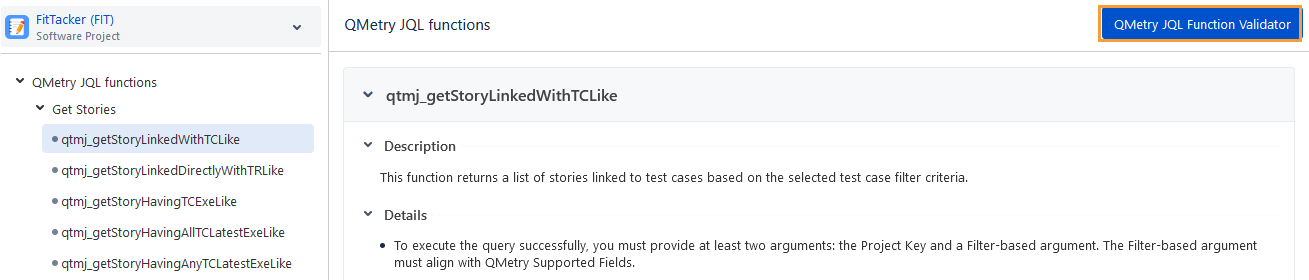
Click the QMetry and select JQL Functions.

QMetry JQL functions appear on the screen and provide enhanced flexibility and control when querying Jira stories and bugs linked to test cases, test cycles, and test executions.
To view function details, click a JQL function in the left navigation pane. The function details appear on the navigation pane on the right.
How to Use QMetry JQL Functions?
First, validate the JQL function in the QTM4J application, and then use the validated JQL functions in the Jira search.
Step 1. Validate QMetry JQL Functions
Click the QMetry JQL Function Validator button.
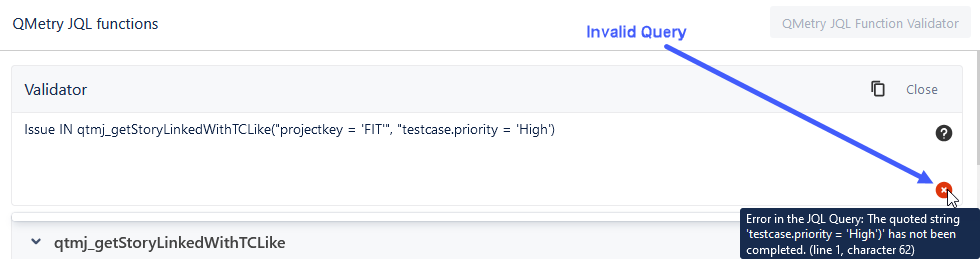
The Validator shows the written query in it.
You can refer to the details provided for the JQL on the screen and modify the query to retrieve the desired records.
The validator displays a check mark if the query is properly formatted and ready to use in Jira.

The validator shows a cross mark if the query contains invalid arguments or values. Hover over the cross mark to know the error in the query, and correct the JQL query accordingly.
Step 2. Use QMetry JQL Function in Jira
After the validator successfully validates the JQL, you can use it in Jira.
Click the Copy icon to copy the validated JQL function.
Go to the Issues page in Jira and switch to Advanced search.
Paste the copied JQL function into the Search box and click Search.
The JQL search retrieves records that match the criteria defined in the function.
QMetry JQL Functions
The table below shows categorized queries with reference links for more information.
Function Name | Description | Reference Link |
|---|---|---|
Get a List of Stories based on Test Cases, Test Cycles, or Bugs | ||
qtmj_getStoryLinkedWithTCLike | This function returns a list of stories linked to test cases based on the specified test case filter criteria. | |
qtmj_getStoryLinkedDirectlyWithTRLike | This function returns a list of stories linked directly to the test cycles based on the specified test cycle filter criteria. | |
qtmj_getStoryHavingBugLike | This function returns a list of stories in the project associated with bugs discovered during the executions of test cases or test steps linked to those stories. |
|
Get a List of Bugs | ||
qtmj_getBugLinkedWithTCLike | This function returns a list of bugs discovered during all the executions of test cases or test steps based on the specified test case filter criteria. |
|
qtmj_getBugLinkedWithTRLike | This function returns a list of bugs discovered during all the executions of test cases or test steps based on the specified test cycle filter criteria. |
|
Get a List of Stories based on Test Executions | ||
qtmj_getStoryHavingTCExeLike | This function returns a list of stories where any of their test case executions match the specified execution filter criteria. |
|
qtmj_getStoryHavingAllTCLatestExeLike | This function returns a list of stories where every latest execution of their linked test cases matches the specified execution filter criteria. |
|
qtmj_getStoryHavingAnyTCLatestExeLike | This function returns a list of stories where any of their latest test case executions match the specified execution filter criteria. |
|
qtmj_getStoryLinkedDirectlyWithTRHavingAllTCLatestExeLike | This function returns a list of stories directly associated with test cycles, where every latest execution of their linked test cases in any test cycle matches the specified execution filter criteria. |
|
qtmj_getStoryLinkedDirectlyWithTRHavingAnyTCLatestExeLike | This function returns a list of stories directly associated with test cycles, and any of their latest test case executions in any test cycle match the specified execution filter criteria. |
|