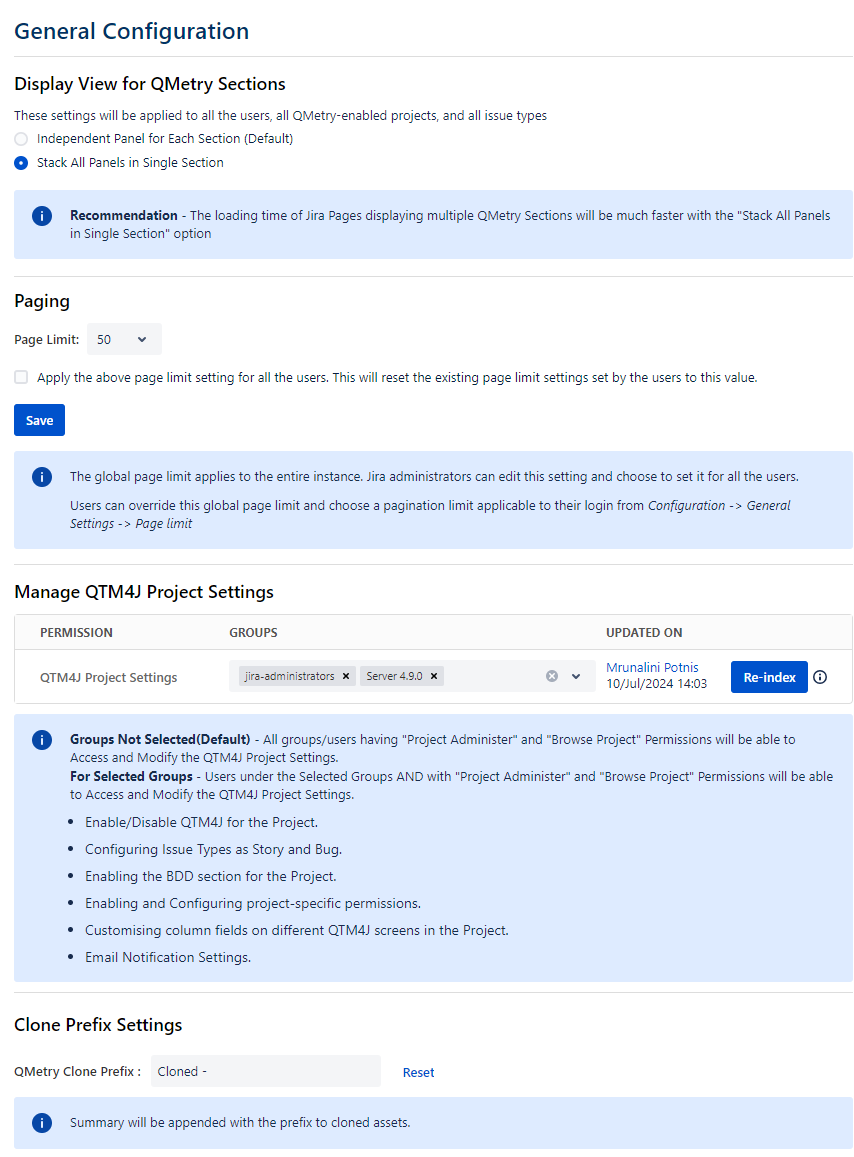
Manage QTM4J Project Settings
Jira Administrators can manage access to modify QTM4J project settings by granting permissions to designated Jira groups. By default, users with Jira's Project Administrator and Browse Project permissions retain access. It minimizes the risk of accidental modifications by other project administrators. The QTM4J Project Settings configurations are available in the Manage QTM4J Project Settings of General Configuration, Global Settings.
Note
Permissions required: The Jira Administrator can configure the Jira Groups whose users can access and configure the QTM4J Project Settings of General Configuration, Global Settings.
Configure QTM4J Project Settings
The configuration for QTM4J Project Settings can be done from the Global Settings page.
Perform the following steps to configure the project settings:
Go to Administration.
Select Manage Apps.
Select Global Settings in QTM4J on the navigation bar.
Select the General Configuration tab.
The General Configuration screen appears.
Locate the Manage QTM4J Project Settings on the screen.
Manage QTM4J Project Settings
Click the Groups drop-down list and select the Group(s) to which you want to allocate the QTM4J Project Settings permission.
Configure Jira Groups
A Jira Administrator can configure Groups (from Settings > User Management > Groups) in Jira at the Jira site level. Once you create a Group, add users to the Group.
If a Group(s) is not selected (Default): All groups/users having Project Administer and Browse Project permissions will be able to access and modify the QTM4J Project Settings.
If a Group(s) is selected: Users under the selected Groups AND with Project Administer and Browse Project permissions will be able to access and modify the QTM4J Project Settings.
If the users have the above-mentioned permissions but are not part of the selected group of Manage QTM4J Project Settings, then the users can just view the QTM4J project setting and permission but could not modify the settings.
Users under the selected Group(s) will be able to access the following QTM4J Project Settings:
Enable/Disable QTM4J for the Project.
Configure Issue Types as Story and Bug.
Enable the BDD section for the Project.
Enable and configure project-specific permissions.
Customize column fields on different QTM4J screens in the Project.
Configure Email Notification Settings.
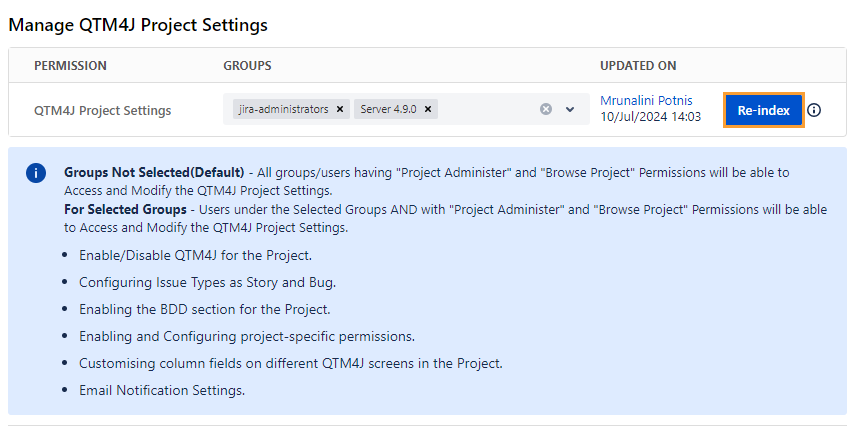
Sync User Groups
When new users are added to or existing users are removed from the Jira Group, QMetry does not receive any updates on it. Hence, reindexing of User Groups or syncing of user permissions is required. You can follow the methods mentioned below to sync the User Groups and user permissions.
Re-index User Groups
Re-index User Groups from General Configuration
Go to Settings, select Apps, select Global Settings in QTM4J, and then select General Configuration.
The Re-index button is provided under the Manage QTM4J Project Settings on the General Configuration page.
You can initiate a reindex of user groups to sync any changes made to these settings or groups within Jira with QMetry.
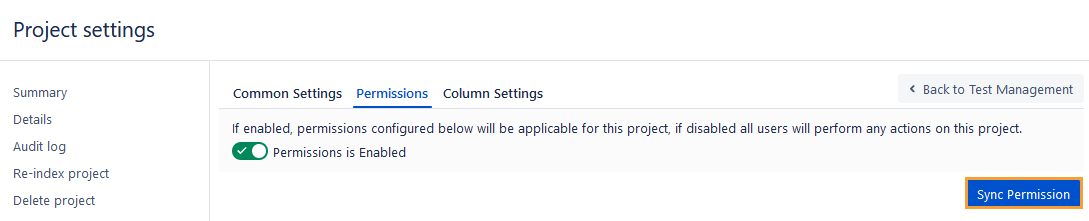
Sync Permissions from Project Settings
Whenever user permissions are modified, it is necessary to synchronize the latest permissions. You can synchronize the latest permissions assigned to users in Jira with QTM4J from Project Settings.
Perform the following steps to sync permissions from Project Settings:
Go to Projects, select Project Settings, and then select QTM4J Settings.
Select the Permissions tab.
Click Sync Permission.
Make sure you turn on the Permission is Enabled option.