Start a New Test Execution from Jira Story View
Users can start a new test execution from the Test Case/Acceptance Criteria panel on the Jira Story page. The option helps users reduce the time and effort required to start test executions. This option provides a seamless and efficient workflow, empowering users to swiftly execute test cases when needed.
For example, testers want the ability to create a new test execution run directly from the Test Case/Acceptance Criteria panel on the Jira Story page so that they can efficiently begin executing a test case without following the lengthy process that involves navigating to the test cycles and creating a new execution.
You can create new executions for a single test case and for multiple test cases at a time.
Create a New Execution for a Test Case
Perform the following steps to create a new execution:
Navigate to the Jira Story page.
Hover over the test case for which you want to create a new test execution.
Click on the Execute icon.
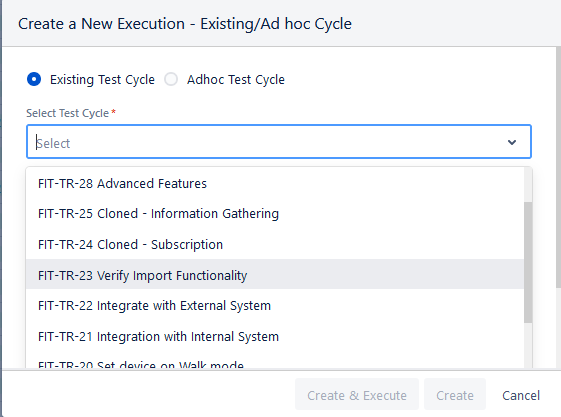
The Create a New Execution - Existing/Ad hoc Cycle screen appears.
Existing Test Cycle: You can select a test cycle from the existing test cycles for which you want to create a new execution.
Select the test cycle from the list of existing test cycles. You can also search for a particular test cycle by its Key or Summary.
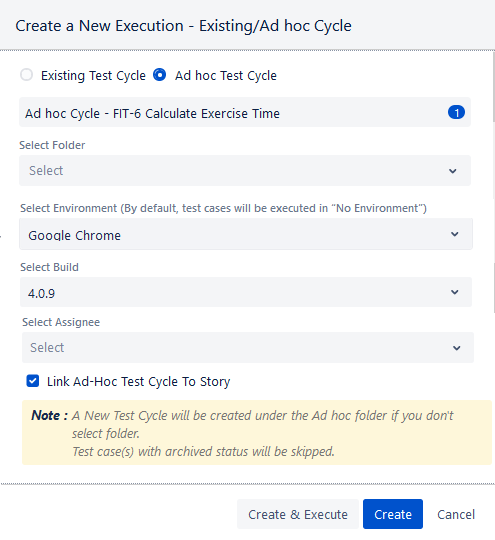
Ad hoc Test Cycle: It will create a new Ad hoc test cycle for execution.
Once you select the Ad hoc Test Cycle option, a test cycle is created based on the story name. The syntax of the Ad hoc test cycle name will be -
Ad hoc Cycle - <Story Key> <Story Summary>The count beside the name shows the number of test cases selected for execution.
You can edit the test cycle name as per your requirements.
Select Folder: By default, the ad-hoc test cycle is created in the Ad-hoc folder. To create the test cycle in a different folder, select the desired existing folder.
Link Ad-Hoc Test Cycle to Story: Select the checkbox to link the ad-hoc test cycle to the current story.
The selected test case is linked to the newly created test cycle.
A new test cycle is created under the Ad hoc folder in the Test Cycle module.
When you execute the test case, it opens the execution page of the Ad hoc test cycle.
After mentioning the test cycle, select Environment, Build, and Assignee from the list, and mention the Actual Time.
Click Create or Create & Execute.
Create: Click the Create button to add the new execution under the Executions tab for the selected test case.
If you click the Create button -
The new execution is added to all the selected test cases.
You can assign execution results to the test run by selecting the status from the drop-down list.
Note
The status of the Execution Result is disabled if all the mandatory execution system and custom fields are not filled.
The execution status is assigned to the test run.
Create & Execute: Click the Create & Execute button if you want to navigate to the execution screen to execute the test execution immediately after creating it.
If you click the Create & Execute button while creating the new execution -
You are redirected to the test case Execution screen to run the test case.
On the execution screen, you can see the test cases associated with the test cycle.
Execute the test case and assign the Execution Result for the execution.
In the Jira Story detail page, select the Execution tab for the test case.
You can view the updated Execution Result in the tab.
Execution in the Same Test Cycle
You can carry out further execution in the same test cycle with different builds, environments, and assignees.
Click the Execute icon to create a test execution.
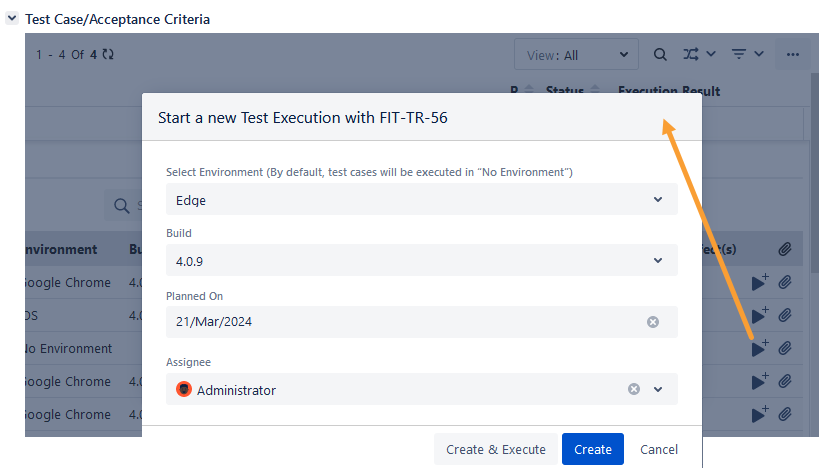
A new execution in the same test cycle will be created, but with the selected values for builds, environments, and assignees.
Create New Executions for Bulk Test Cases
You can create new executions for multiple test cases at a time.
Select the test cases and click on the New Execution option. This option will be visible on the screen only after the selection of at least one test case.
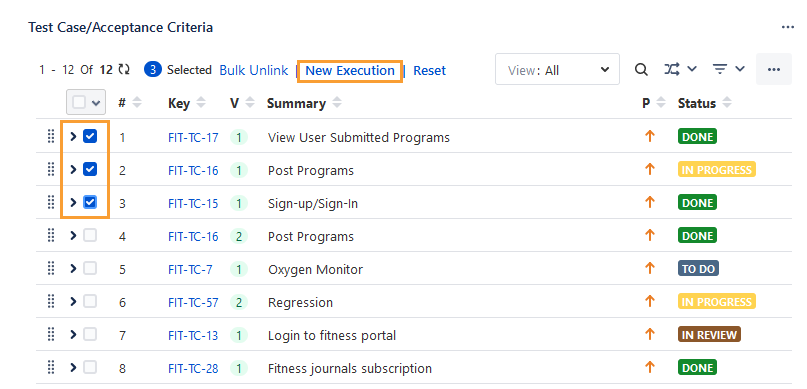
Create: Click the Create button to add the new execution under the Executions tab for the selected test cases.
Create & Execute: Click the Create & Execute button if you want to navigate to the execution screen to execute the test executions immediately after creating them.
In the case of the Ad hoc Test Cycle, the count of selected test cases is displayed alongside the test cycle name.
The new execution is added to all the selected test cases.
If you have clicked on the Create & Execute button while creating the new execution, you are redirected to the test case Execution screen with the selected test cases to perform the new execution.
Set Execution Fields
You can add values to the Test Execution system and custom fields from the story detail page.
Note
You cannot update the Execution Result of a test cycle if required system or custom fields are left blank during execution. An error message prompts you to complete all mandatory fields.
To fill the execution fields, follow the steps mentioned below.
Perform the following steps to set execution fields:
Click the Execution Fields icon. The icon appears blue when the mandatory execution fields are left blank.
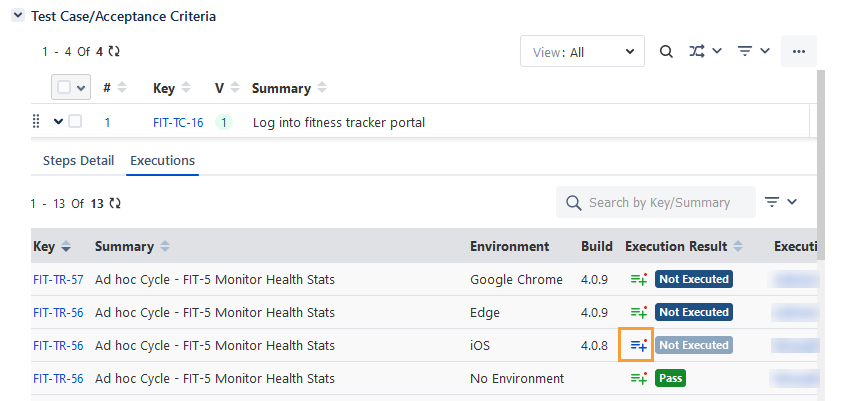
The Set Execution Fields dialog appears.
The Test Execution Custom Fields are displayed as per the current project of the test cycle in which the test case is linked.
Enter the values in the system/custom fields.
Click Close to save the changes.
In the Executions tab, the Execution Fields icon turns green once the mandatory fields are filled.