View Test Cases from Jira Issue Page
When you add a Jira issue to a test cycle, all the test cases associated with that test cycle will be linked to the Jira issue automatically.
Go to the Jira issue detail page.
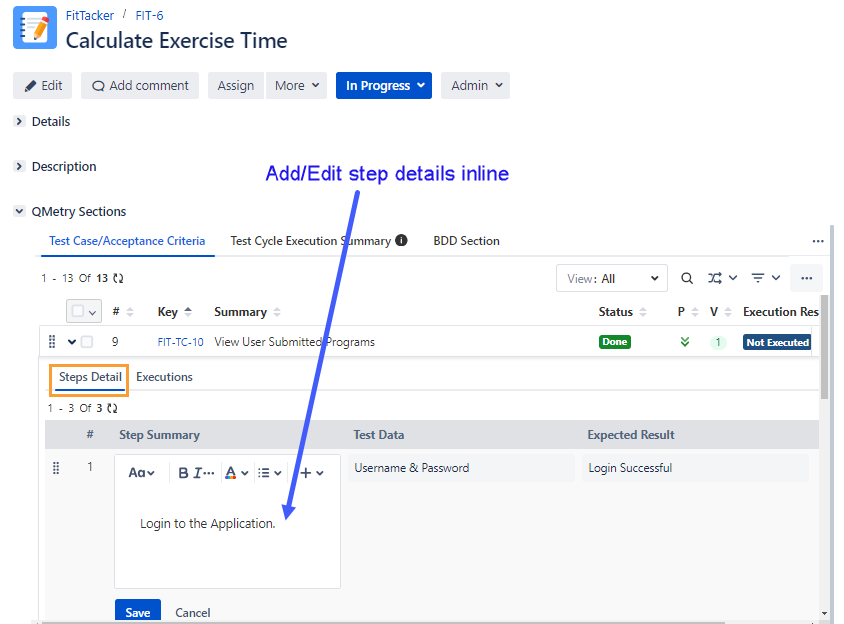
Expand the linked test cases under the Test Case/Acceptance Criteria.
There are two tabs: Step Detail and Executions.
Steps Detail: You can add new test steps and edit existing test steps from the Story details page. Expand the test case and open the Step Detail tab. The section is editable, wherein you can add new steps or make changes in the existing details of steps. The changes are reflected in the Test Case module.
Executions: You can see how many Test Cycles have been executed for the Test Case with their latest execution result. Defects logged during test execution are also displayed along with the execution result.
Select the Executions tab.
The grid displays the following columns:
Test Cycle Summary: Test Cycle with which the test case was associated.
Execution Result: Latest execution status of the test case in that particular test cycle.
Environment: Environment/Platforms the test was run against.
Build
Execution Assignee
Executed By: User who has executed the test cycle.
Executed On: Timestamp for the executed test cycle.
Defects: Count of defects linked to the test case during execution.
Execution Custom Fields :CustomFieldBlue: : Click the custom fields icon to update the Execution Custom Fields. In the Executions tab, the custom fields icon changes to green color :CustomFieldGreen: once the mandatory custom fields are filled. Test Execution Custom Fields are displayed as per current project of test cycle in which test case is linked.
Attachments
If defects are linked while execution, the defect count is displayed under the Defects column.
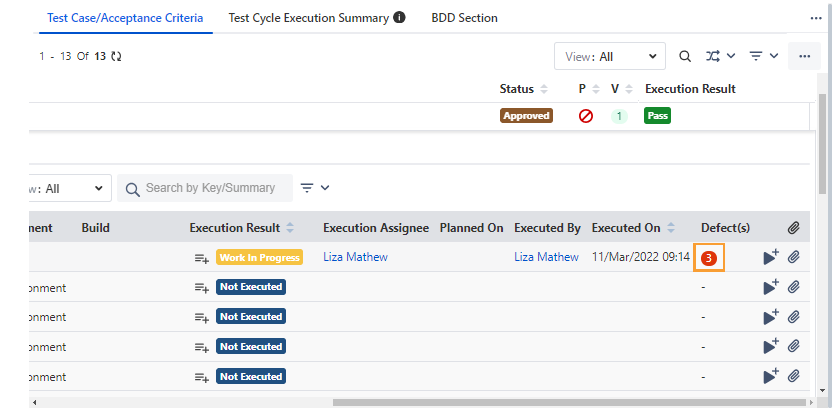
To view the logged defects for the test case, click the defect count. The Link Defects screen appears.
To view the linked defects in Jira, click View in Issue Navigator. It enables testers to quickly navigate to the Jira Issue search.
The page in Jira opens with the linked defects on it.
Stack All Panels in a Single Section
The Global Settings for Display View for QMetry Sections feature enables the Jira Administrator to apply global settings that automatically organize all QMetry panels into a single section, enhancing the loading performance of Jira Issues. Refer to Display View for QMetry Sections.