Import Test Cases
The Import Test Case feature helps you import test cases from an Excel file (CSV/XLSX format) into the QMetry Test Management for Jira app.
For example, an organization has its test cases documented in an Excel file. Now, they have chosen the QMetry Test Management for Jira app and want to import their test cases into QMetry.
Note
Required Permissions:
Jira Permissions:
Browse Project permissions are required.
QMetry Permissions:
If QMetry permissions are enabled, the following permissions are required.
Import Permissions
All Test Case Permissions (except Delete)
Configuration Modify Permission - Users can create labels, components, and new values for custom fields via import.
If QMetry Permissions are not enabled, then users with Project Access permissions can import test cases to the project.
Accessing the Import Feature
To access the import feature,
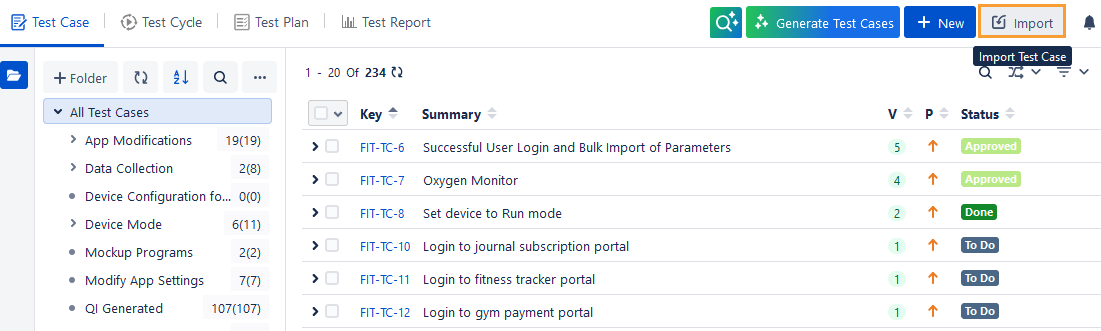
Click the QMetry menu, go to Test Management, and select the Test Case tab.
Click Import and select Excel/CSV.
Note
If QMetry permissions are enabled, the Import button will be enabled only if the users have both Import and Test Case Create permissions.
Steps to Import Test Cases From a csv or xlsx Format
There are three stages to import an Excel file into QMetry Test Management for Jira:
Upload File
Map Fields
Import File
Note
Supported file types are XLS, XLSX and CSV.
You can import a test case file with a maximum of 5000 rows for test cases and steps.
You can upload a file with a maximum 10 MB of size.
If there are multiple import operations being carried out, it is recommended to limit the simultaneous imports to five.
Step 1. Upload File
Download Template.xlsx for your reference. Ensure the file you are importing is in QMetry format.
The Summary field is mandatory.
When importing Test Case Steps, you must provide a value for the Step Summary field; it cannot be left blank.
You must specify the user key in the Assignee and Reporter field columns in the Excel sheet. To obtain the key for a specific user, execute the Jira API shown below and note the highlighted key. In older versions of Jira, your key might resemble the username; however, in the latest versions of Jira, your key is different from the username.
http://{BASE_URL}/rest/api/2/user/search?username={username}
Specify Sprint as per the format Board Name/Sprint Name
If you want to import test cases/test steps with attachments, then follow the steps 1. Upload Test Cases and 2. Upload Attachments.
If you want to import only test cases/test steps, then follow step 1. Upload Test Cases. You can just skip step 2. Upload Attachments.
Upload Test Cases:
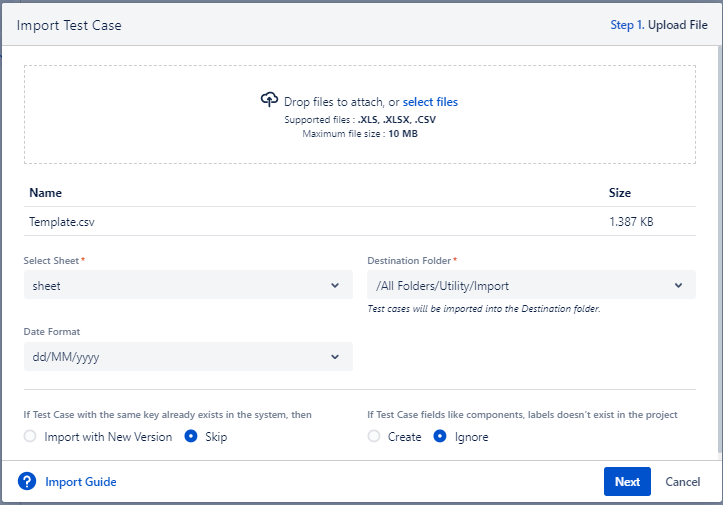
You can either browse and select the Excel file to upload, or drag the Excel file and drop it in the specific area on the screen.
Upload Attachments:
Follow this step only if the test cases or test steps being imported include attachments and the attachment fields are mapped correctly.
You can also import attachments from separate folders along with their respective test cases or test steps during the import process. The feature saves the efforts and time of users as they do not have to add attachments to individual test cases/test steps.
Note
If attachment linking fails for any reason, the test case import will still complete. In such cases, you can either delete the imported test cases and re-import them or manually link the attachments to the imported test cases.
Download a sample zip file of attachments for your reference. After you unzip, skip the main folder from the path and mention the path thereafter in the template.
Note
You can upload attachments in ZIP format and include files such as PNG, JPEG, DOC, PDF, XLSX, and MP4.
The maximum file size allowed to upload is 100 MB.
You can import multiple attachments for a single test case or test step at one time by using a comma separator.
Browse and attach the zip file that contains attachments that you want to import, along with test cases/test steps. The system imports attachments according to the attachment folder structure specified in the Excel file uploaded in the Upload Test Cases step above. Refer to the Attachment Fields section for more details.
Once you upload the test case file and/or the attachment file, mention the following details.
Select Sheet: Once you upload the file, the drop-down starts showing the sheets included in the file.
Destination Folder: It displays the default path of the selected folder in the Test Case folder tree. This is the path wherein the test cases will be imported. You can change the import folder path by selecting another folder path in the Destination Folder drop-down list.
Date Format : This option is available only in case the import file is in CSV format. This option allows to choose the date format used for the Date type column from the CSV file.
If a Test Case with the same key already exists in the system, then:
Import with New Version: This will create a new version of your existing Test Case.
Note
If QMetry permissions are enabled, the Import with New Version option will be available only to users with the Test Case Versioning permission.
Skip: The test case will be skipped.
If the test case fields, like components and labels, do not exist in the project:
Create: New values for the list will be created in QMetry Test Management for Jira.
Note
If QMetry permissions are enabled, the Create option will be available only to users with the Configuration Modify permission.
Fix Version, Sprint, Assignee, and Reporter will not be created.
Ignore: New values in the Excel file will be imported as blank, and existing values will be imported.
Click Next.
Step 2. Map Fields
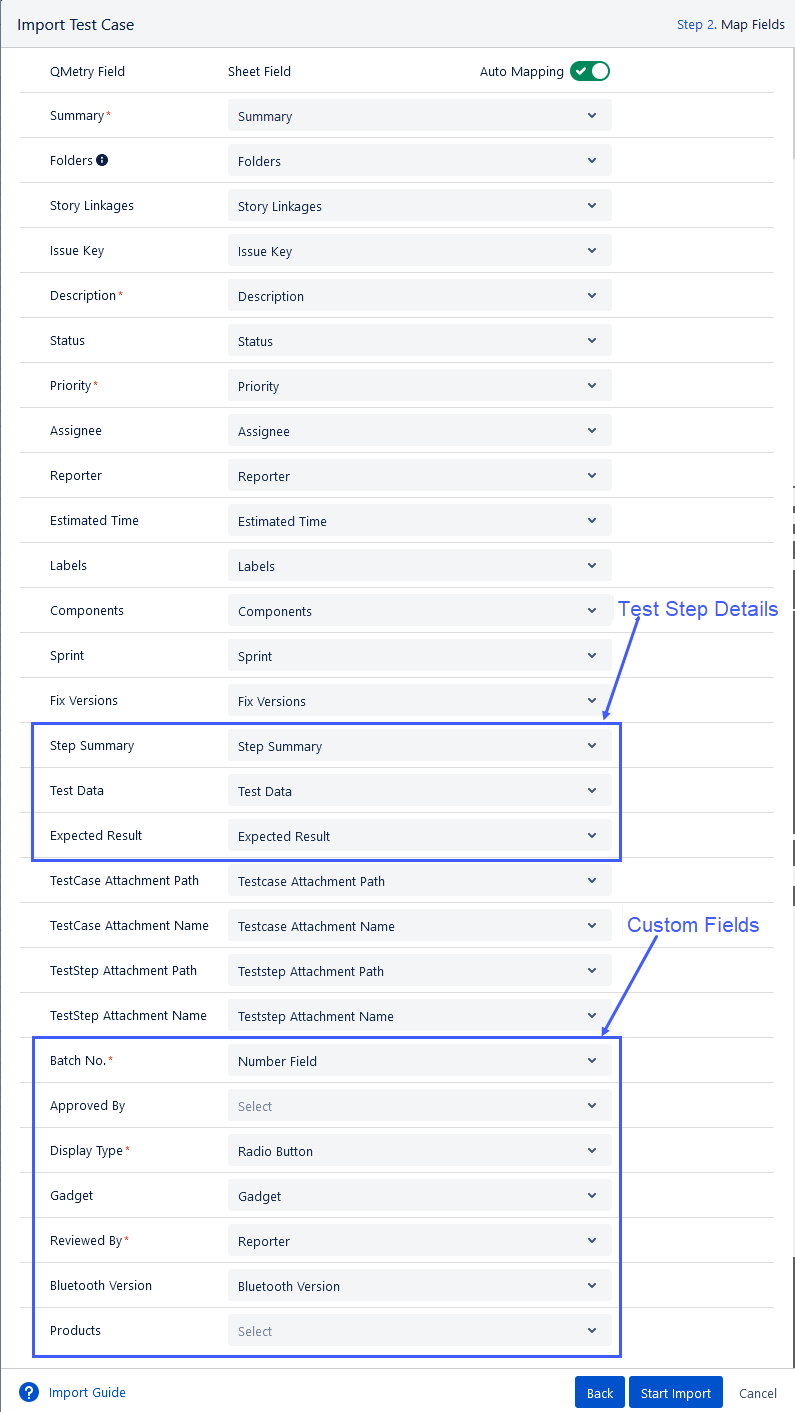
There are two columns on the screen: QMetry Field and Sheet Field. Map the Sheet Fields with QMetry Fields. Enable Auto Mapping to auto-map the fields.
The field values in Excel will be imported into QMetry for Jira accordingly. (Custom fields can be mapped.)
QMetry Fields marked with * are mandatory to be mapped with the Sheet Field.
If the system and custom fields are marked as mandatory in the Configuration section, ensure these fields are not left blank in the Excel sheet.
Folder
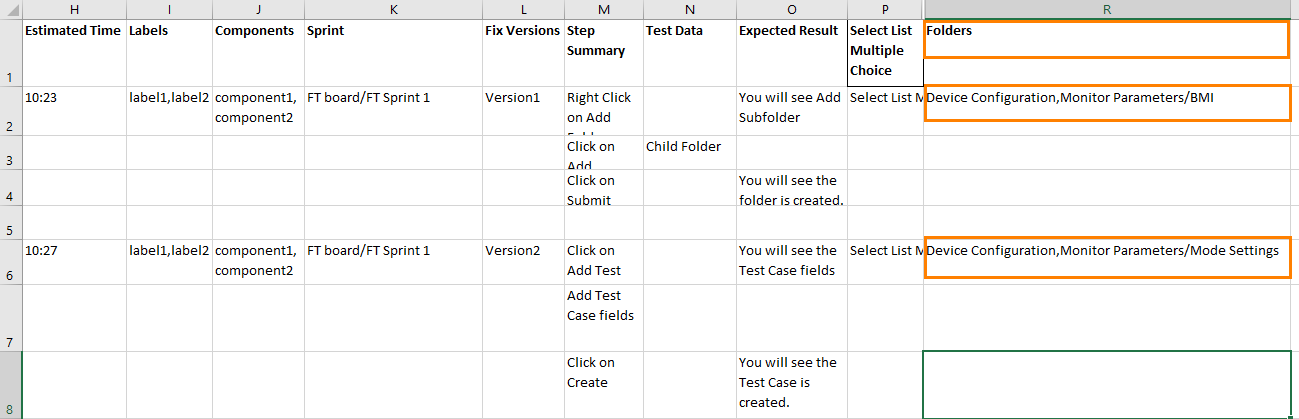
In addition to the Destination Folder Path selected in Step# 1, you can import test cases in the Folder Paths defined in the Excel file. This folder path is mentioned in a specific column in the Excel file. You can also mention multiple folder paths to import test cases to multiple folders simultaneously. It helps users import the test cases in multiple folders at a time to avoid repeated imports of the same test cases. If the folder field is not mapped, then the test cases will be imported into the Destination Folder path selected in step # 1. If the folder field is mapped, the test cases will be created in the folders under the Destination Folder path selected in Step # 1. If the folder does not exist, it will be auto-created according to the hierarchy specified in the folder path in the actual file.
If a folder defined in the Excel file already exists in the folder hierarchy, it will be reused during the import process.
You can mention multiple comma-separated (,) folder paths in the column. For example, if you want to import test cases in Folder A and Folder B, you can mention in the import file: Folder A, Folder B.
You can also mention a Folder path that contains a subfolder. For example, “Configuration/Device Configuration”.
If the Folder Path mentioned in the sheet exists under the selected Destination Folder, then the test cases will be imported under the existing folder(s). So make sure you select the Destination Folder in Step #1 accordingly.
If the Folder Path mentioned in the sheet does not exist under the Destination folder, then new folders will be created under the Destination Folder Path that you selected at Step# 1 above. So make sure you select the Destination Folder accordingly.
Story Linkages
QMetry Test Management for Jira enables you to link test cases with relevant Jira stories (that is, Jira issue type mapped as Story) while importing the test cases through an Excel sheet using the Import Test Case feature. The mentioned stories should be available in Jira.
A column Story Linkages is added to the import test case sheet. You can also find the column when you export existing test cases to Excel. You can re-import the Excel sheet with story keys filled in.
Define the Issue Key in this column, which should be mapped at Step# 2 of Map Fields while importing test cases. The defined key is then linked to the test case that is being imported.
To link multiple stories in a test case at a time, define comma-separated Issue Keys in the Story Linkages column. The feature is helpful when users have bulk test cases to import and also have to link stories with these test cases.
Note
Required Permission: You must have the Requirement Edit permission to import test cases with Story Linkages.

Attachment Fields
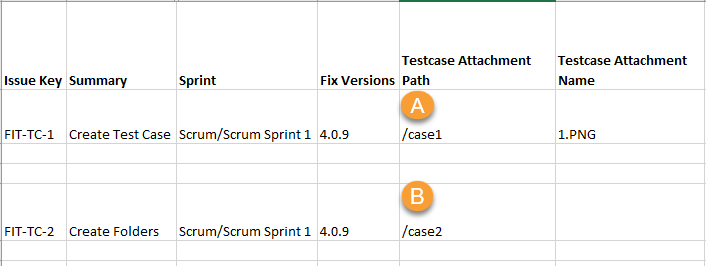
Test Case Attachment Path: Path of the folder where the attachments are stored in the attached zip file. If the files in zip folder are at root folder level, then this field can be left blank.
Test Case Attachment Name: Name of the attachment to be linked with the test case.
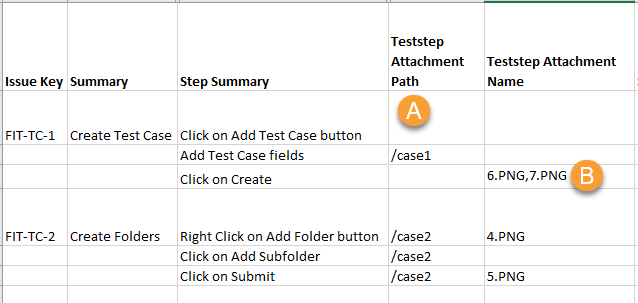
Test Step Attachment Path: Path of the folder where the attachments are stored in the attached zip file. If the files in zip folder are at root folder level, then this field can be left blank.
Test Step Attachment Name: Name of the attachment to be linked with the test step.
You can place attachments either at the root folder level or within subfolders in the ZIP file.
Scenario 1: When the attachment is located under the sub-folder of the zip.
(A) When the sub-folder name and the Attachment Name are specified in the Excel file, then that particular file under the mentioned folder will be attached to the test case/test step.
(B) When only sub-folder name is mentioned in the Excel file, then all the files under that folder will be attached to the test case/test step.
Scenario 2: When the attachment is located at the root folder of the zip.
(A) When the Attachment Path is not mentioned, then all the files at the root folder will be attached to the test case/test step.
(B) When only the Attachment Name is mentioned, then that particular file will be attached to the test case/test step.
For the Folders QMetry field, select the Excel sheet column in the Sheet Field in which the folders are mentioned.
Import Test Cases with Parameterized Steps
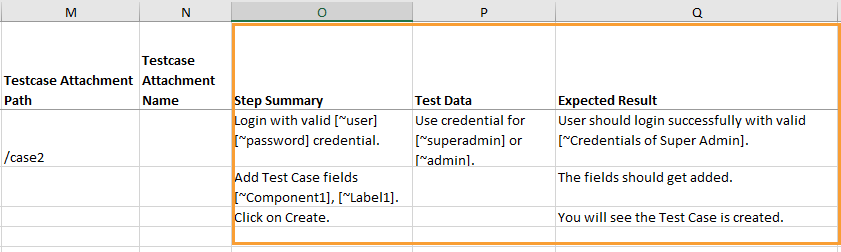
QMetry Test Management for Jira allows importing test cases with parameterized steps while importing test cases through Excel. If the parameters already exist in the project Configuration section, they will be reused. If the parameters are not available in the Configuration section, they will be created in that section.
For example, testers need to import test cases, some of which contain parameterized steps, in Excel. The team needs to import parameters along with test case and step data in one go so that they can avoid spending time adding those parameters individually.
Note
Required Permissions:
Configuration Modify permissions
Test Case Edit permissions
Points to consider:
Use the syntax of the parameterized step in the Excel file is [~Parameter_name]. For example, [~Username].
When Excel has test cases with existing parameters imported, then the parameters are reused in the steps and associated in the Parameters section in the Steps tab on the test case detail page.
When an Excel file containing test cases with parameters not present in the QMetry Test Management for Jira project, the parameters are automatically created in the project, provided the user has Configuration Modify permissions. If the user lacks the required permissions, the new parameters in the test steps will be treated as plain text and will not be created as parameterized values.
Note
This feature does not apply to shared test cases in the project.
Once you are done with mapping the fields, click the Start Import button.
Step 3. Import
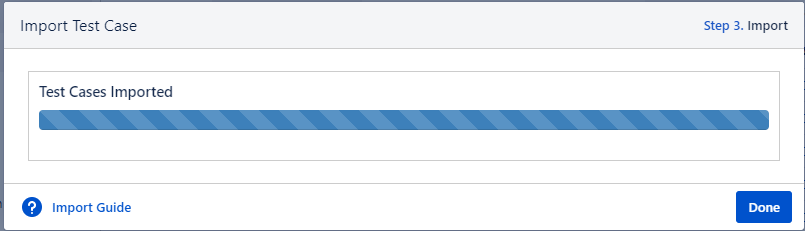
The bar on the screen shows the progress of the test case import.
Click Done when the import process is over.