Two-Dimensional Report
QMetry Test Management for Jira provides a Two-Dimensional Report, which helps QA Managers gain deeper insights into the testing activities and enhance decision-making for all the modules. The feature enables users to generate two-dimensional reports for all the test entities with multiple primary and secondary combinations.
Configure and Generate Two-Dimensional Reports
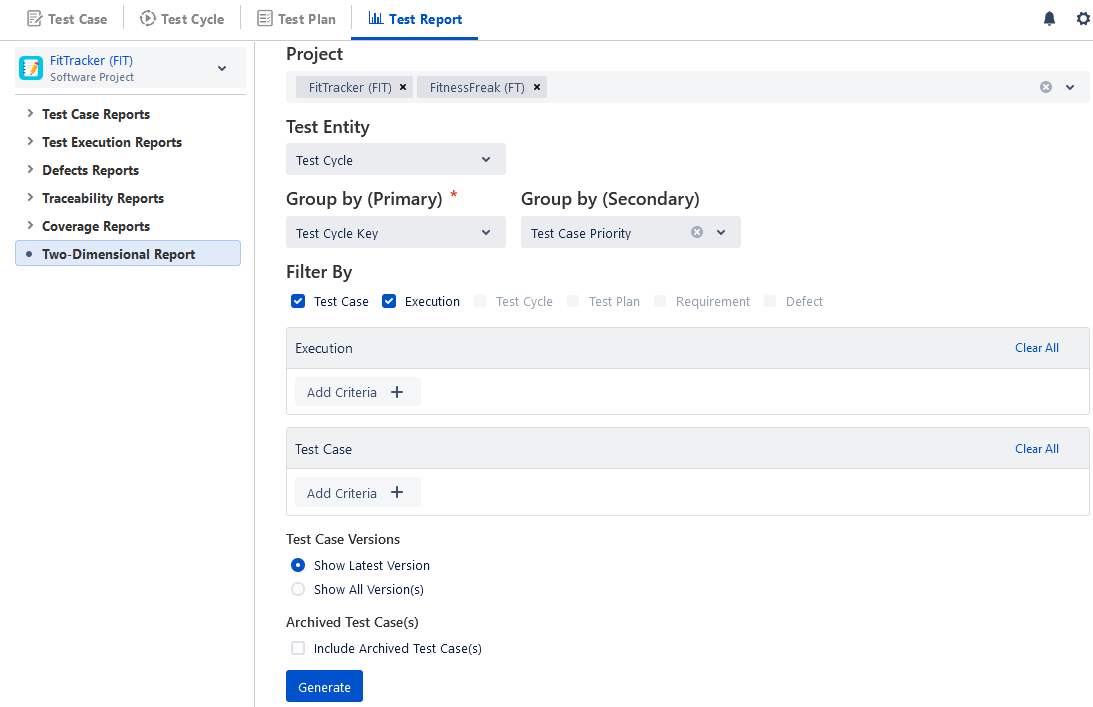
Mention the following details to configure the report.
The report can be generated for all types of custom fields except the Single Line Textbox and Multi Line Textbox types of custom fields.
Project: You can select multiple Projects.
Test Entity (Mandatory): Select the entity on which you want to generate the report:
Test Case
Test Cycle
Test Plan
Test Execution
Group by (Primary): This is a mandatory field to select. It represents the X-axis. The fields are populated as per the Entity/Module you selected above.
Group by (Secondary): This optional field represents the Y-axis. The fields are populated as per the Entity/Module you selected above. If the field is left blank the count of assets is shown grouped by the primary field selection.
Filter By: Select filters from Test Case, Execution, Test Cycle, Test Plan, Requirement, and Defect. You can select a maximum of two modules at a time.
Test Case
Execution
Test Cycle
Test Plan
Requirement
Defect
Some two-dimensional reports are mentioned below with multiple combinations.
Sr. No. | Entity | Group by (Primary) (x-axis) | Group by (Secondary) (y-axis) | Resultant Report |
|---|---|---|---|---|
1. | Test Cycle | Requirement Key | Custom Field | A two-dimensional report that displays the test cycle count based on the Story Key and custom fields. |
2. | Test Case | Test Case Project Key | Test Case Priority | A two-dimensional report that displays the test case counts grouped by Project and Priority. |
3. | Test Execution | Execution Assignee | Test Case Execution Result | A two-dimensional report that displays the Execution Assignee-wise test case execution counts grouped by Test Case Execution Result. |
4. | Test Case | Test Case Folder | Test Case Priority | A two-dimensional report that shows the count of test cases in each test case folder grouped by priority. |
For example,
We want to generate a test cycle-wise report displaying the count of associated test cases grouped by priority.
Here, we’ll select the “Test Cycle” as Entity, “Test Cycle Key” as the Primary Group By, and “Test Case Priority” as the Secondary Group By.
You can apply the required filters you want on the modules/entities.
Click the Generate button.
View Two-Dimensional Reports
Reports can be viewed in the following formats:
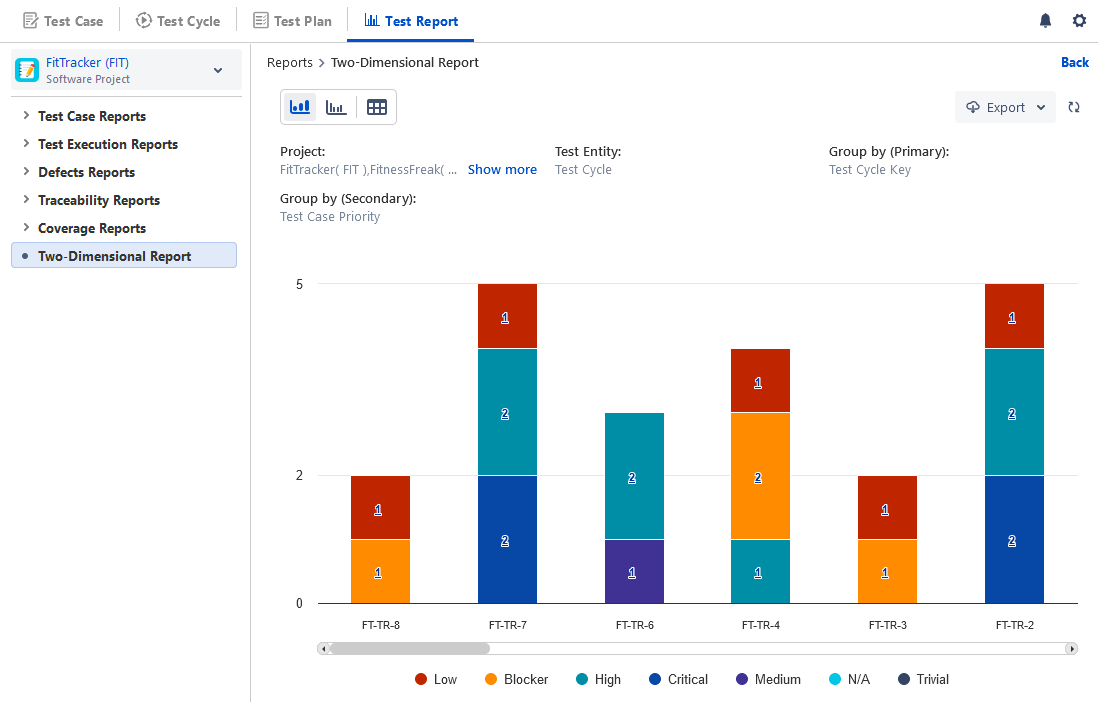
Bar Chart (Stacked Bar Chart)
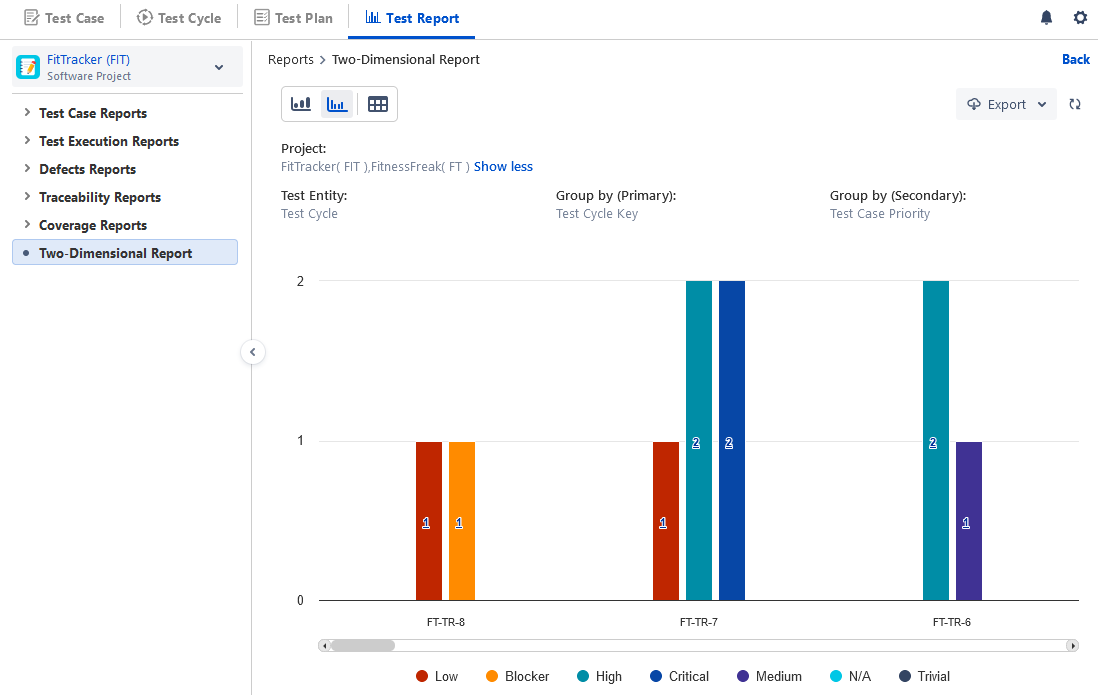
Verticle Grouped Bar Chart
Tabular View
The report displays the count of entities (i.e. Test Cases, Test Cycle, Test Plan, or Test Executions) for the selected Primary Group By and Secondary Group By options. For the Bar charts, you can view the totals and counts without hovering over the chart.
In this example, the generated report shows the test cycle-wise count of associated test cases grouped by Priority.
Bar Chart (Stacked Bar Chart)
Vertical Grouped Bar Chart
Tabular View
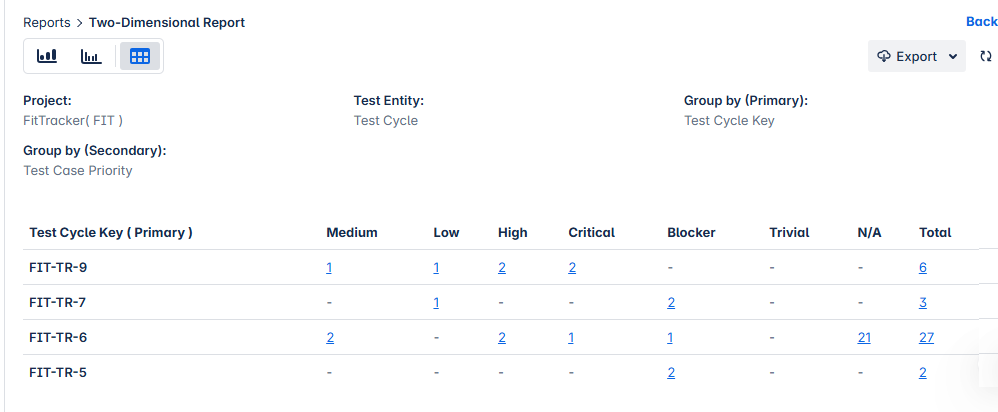
For this example, the tabular view shows the status-wise test case count for individual test case folders and the Total count at the end.
Drill Down Report
You can drill down the chart by clicking on the area of the chart that you want to drill down to view detailed records. You can export the drilled-down report to XLS.
The drill-down displays records for the area clicked on the chart.
You can change the filter on the Secondary Group by adding or removing the field values to view relevant records.
Export Report
You can export the report charts in XLS, PNG, JPEG, PDF, and SVG and then share them with other stakeholders.
Share Report
You can share the report filter. Refer to the Save Filter section Configure and Generate Reports for more details.