Configure and Generate Reports
You can configure reports by applying filters on fields such as Test Case, Test Cycle, Test Plan, Execution, Story, and Defect. Reports can be generated for a single project or across multiple projects based on their configuration.
QMetry retains the last-used filter criteria for each user. Users can also save filters using a naming convention and reuse them later to generate dashboard reports.
Note
Permissions required:
Jira Permissions: Browse Project permissions
QMetry Permissions:
If this option is enabled, then the Report View permission is required.
If this option is not enabled, any user with the Jira Browse Project permission can view the report.
Apply Filter Criteria
The report is configured based on the following criteria.
Project
By default, the current project gets selected in this Filter. The Jira browse project permission is required to select a project in this filter. You can also select multiple projects and apply filters on system as well as custom fields to generate the cross-project report.
Filter By
You can define the criteria and apply the filters based on these criteria. You can apply filters to get the desired data. The filters can be applied to various fields of the Test case, Execution, Test Cycle, Test Plan, Requirement(Story), and Defects. Once the filter is applied and the report is generated, the filter is preserved for the user until it is changed again.
You can filter test cases, test cycles, and test plans on system fields as well as custom fields.
Note
The ability to filter on custom fields is available in version 4.1.8 and later.
These custom fields are also displayed when you export the report in Excel.
For example, custom fields created for the Test Case module (from Configuration > Project Configuration > Custom Fields) appear on the drop-down list along with system fields. You can construct filter criteria based on custom fields to apply to test cases. The report is generated for the filtered test cases.
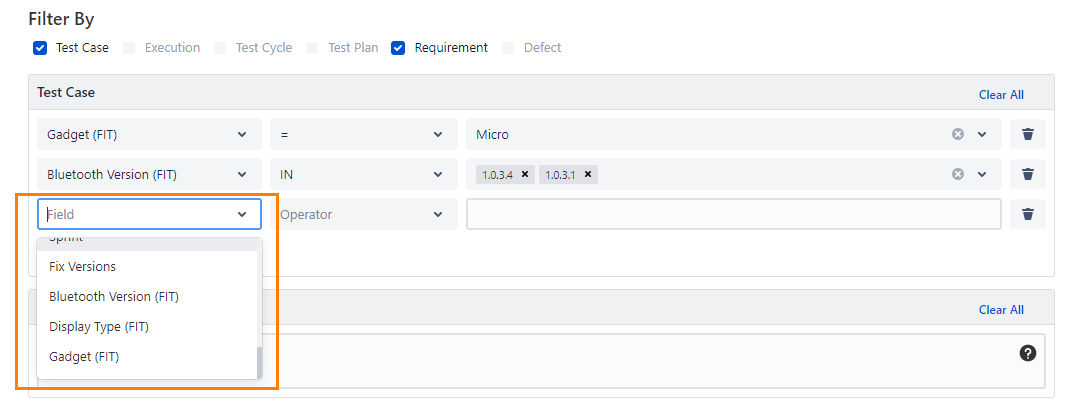
Perform the following steps to apply filters:
Select the module you want to filter the report data on. You can select only two modules at a time. As soon as you select the module, its criteria panel appears on the screen to define the criteria to filter report data.
Click the Add Criteria button. A row is added to define Operation, Operator, and the corresponding value to construct a criterion to filter the data. You can delete a criterion by clicking on the Delete icon.
Repeat the same steps for another module if you have selected to apply the Filter.
Requirements and Defects: For Requirements and Defects, the JQL panel is provided to apply a filter. Users can apply the JQL filter as per the requirement, same as provided in Jira advanced search. It allows users to use multiple Jira fields like Project, Issue key, Issue Type, Issue Status, Priority, and so on in the JQL filter to generate the report. The JQL panel supports auto-suggestion.
Users can generate reports filtered by JQL that contain more than 1000 records. The following table shows the limits as per the Jira database:
Jira Database | Maximum records allowed to generate reports filtered using JQL |
|---|---|
Postgres | 10000 |
MySQL | 10000 |
MSSQL | 2000 |
Oracle | 1000 |
Test Case Versions
The following filter criteria are applicable to the Test Case filter.
Show Latest Version: Select the option if you want to view the report only for the latest version of the test case. This option is selected by default.
Show All Version(s): Select the option if you want to view the report for all versions of the test case.
Archived Test Cases: Select the Include Archived Test Cases option to include archived test cases while generating the reports.
Executions
Note
The option to generate reports for the latest execution or all executions of a test case is available in version 4.1.8 and later.
The following filter criteria are applicable to the Executions filter.
Last Test Execution: Select the option if you want to view only the last execution of test cases in the report.
All Test Execution(s): Select the option if you want to view all the executions of test cases in the report.
Archived Test Cases: Select the Include Archived Test Cases option to include archived test cases while generating the reports.
Archived Test Cycles: Select the Include Archived Test Cycles/Executions option to include the executions of archived test cycles while generating the reports. The executions of archived test cycles are not included in reports by default.
Test Cycle
The following filter criteria are applicable to the Test Cycle filter.
Test Case Versions
Show Latest Version: Select the option if you want to view the report only for the latest version of the test case. This option is selected by default.
Show All Version(s): Select the option if you want to view the report for all versions of the test case.
Archived Test Cases: Select the Include Archived Test Cases option to include archived test cases while generating the reports.
Archived Test Cycles: Select the Include Archived Test Cycles/Executions option to include the executions of archived test cycles while generating the reports. The executions of archived test cycles are not included in reports by default.
Test Plan
The following filter criteria are applicable to the Test Plan filter.
Test Case Versions
Show Latest Version: Select the option if you want to view the report only for the latest version of the test case. This option is selected by default.
Show All Version(s): Select the option if you want to view the report for all versions of the test case.
Archived Test Cases: Select the Include Archived Test Cases option to include archived test cases while generating the reports.
Archived Test Plan(s): Select the Include/Exclude Archived Plans option to include the archived test plans while generating the reports.
Click the Generate button once you apply the required filter.
Note
The report updates dynamically when new data matching the selected criteria is added.
Save Filter
Users can create and manage their own filters. They can save multiple report Filter criteria with which they have generated a report. Furthermore, users can also update the criteria or delete the criteria.
For example, Report owners can share the filter criteria with other users by granting view and edit permissions.
Users with view access to other users' report filters can reuse them in their dashboards.
Users with edit permissions on other users' report filters can modify the filter criteria or grant view permissions to others.
This helps to improve collaboration and reusability.
Note
Permissions required: You must have the Reports View permission to be able to access the filter in the Test Reports module and in the QMetry Dashboard.
Filters can be Private or Shared.
Private filter: The filter is private when it is not shared with any other user. Only you (the current user) can access the filter. Select the “Private” option for the Viewers and Editors drop-down menus to keep the filter as “Private”.
Shared filter: You can create a filter and share it with other users. This filter is called a shared filter. You can share the filter with particular users, groups, and also with the organization as a whole. The filters remain Private by default.
My Organization: Users, who have access to the current Jira instance, can view the shared filter. Edit permissions are not available for the organization.
Group: The selected group of Jira users of the current Jira instance can view/edit the shared filter.
User: The selected Jira user(s) can view/edit the filter.
The shared filters can be accessible across projects.
Filters can be shared with View permissions to the selected groups and your organization (i.e. users of the current Jira instance)
The users with “View” permissions can only view and use the filter to generate reports and gadgets. They cannot update the shared filter in the report.
Filters can be shared with Edit permissions to the selected user(s) and groups.
The users with “Edit” permissions can view and use the filter to generate reports and gadgets. They can also modify the filter as per their needs in reports and grant “View” permission to others. Changes in the shared filter will be saved for all the users including the creator of the filter.
Perform the following steps to share a report filter:
Go to the Test Report module.
Select Project and apply Filter criteria.
To save the applied filter, click Save As.
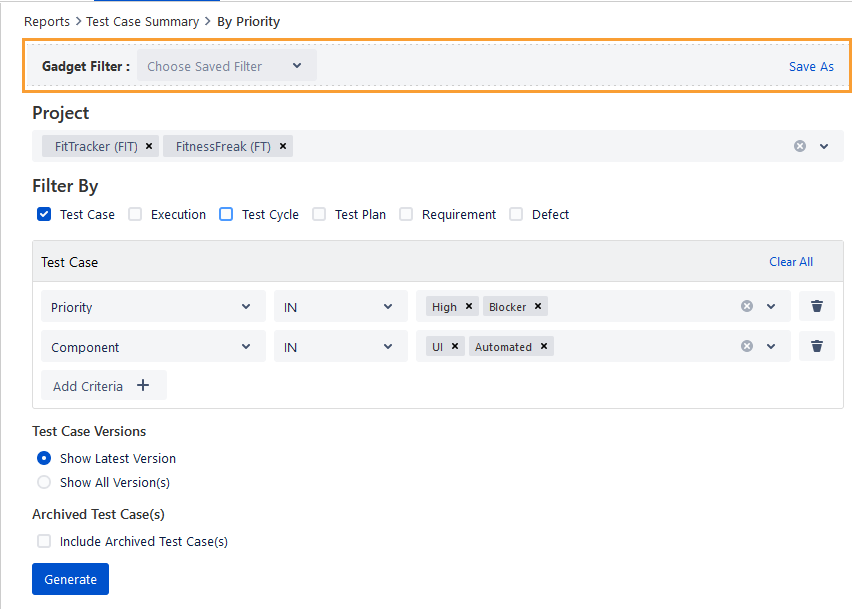
The Save Filter dialog appears.
Enter the Name and Description for the filter.
Configure Viewers for the Filter. If you do not want to share the filter with other viewers, just keep it “Private”.
To share the filter with other viewers, select Viewers from the drop-down: My Organization, Group.
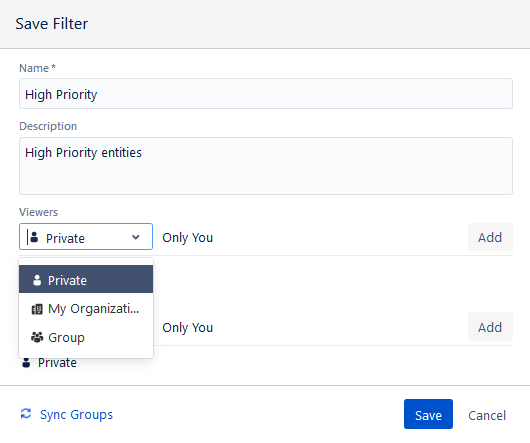
For Group, start typing the name of the group in the field and the name will be populated.
Select the required one. Then click Add.
Sync Groups: If an existing user is removed from the group, then clicking on the Sync Groups option will remove the access rights of that user over the filter.
The selected group name is added to the screen.
Configure editors for the Filter. If you do not want to share the filter with other editors, just keep it “Private”.
To share the filter with other editors, select editors from the drop-down: User, Group.
User: Select the user(s) with whom you want to share the filter. Start typing the name in the field, the matching name will populate. Select the required user and then click Add.
Group: For Group, start typing the name of the group in the field and the name will populate. Select the required group and then click Add.
Click Save.
The saved Filter Details are displayed at the top with the details of Created By, Created On, Updated By, Updated On, Viewers, and Editors.
The following options are available related to the filter.
Update: The creator of the filter can use this option to edit the filter criteria. For other users with whom the filter is shared, the option will appear as enabled/disabled as per the access rights granted to them for the filter.
Delete: Only the creator of the filter can delete the saved filter. The deleted filter will be available on the Gadget Filter drop-down for all the user(s).
Clear Filter: The option is used to clear the applied filter and reset the screen to its default mode i.e. without any filter applied to it.
For more information about how to use filters, see Saving your search as a filter.
Using the Shared Filters
In Test Reports, the Filters are shared with “View” and “Edit” rights.
Users with the “View” permissions can only view and use the filter to generate reports and gadgets. Filters with “View” permission are displayed with a lock icon on the Gadget Filter, which means the users, with whom the filter is shared, are not authorized to edit it.
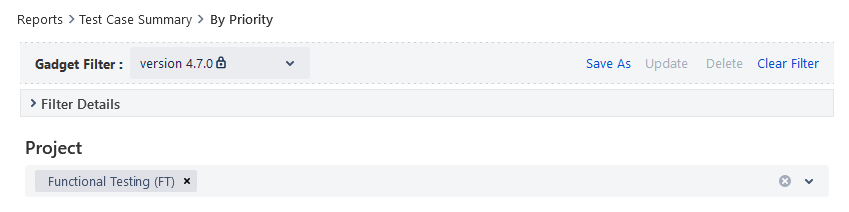
Users with “Edit” permissions can view and use the filter to generate reports and gadgets. They can also modify the filter as per their needs in reports. Any updates/changes in the shared filter will be saved for all the users including the creator of the filter.

Dashboard Gadgets (QMetry Charts)
The users with whom the filter is shared (either with View/Edit rights) can access the filter from a gadget in the Dashboards menu. They can view or use the saved filters but can not edit any criteria of the saved filters.
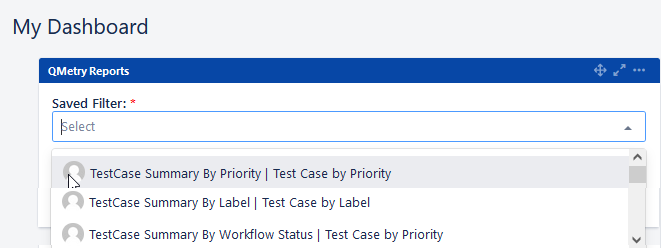
On hover over the profile pic, it shows the user name who has created the filter. This way, users can identify their own filters and filters that are shared by other users.
The filters are displayed in the syntax: <Report Name> | <Filter Name>. It helps users identify the report to which the filter belongs.