QMetry Assets Macro
Integrate QMetry Assets Macro With Confluence
Once your QTM4J application link is configured with the QTM4J Confluence Integration app, you can integrate the QMetry Assets Macro in your Confluence page and start accessing QMetry Test Management for Jira assets.
You can integrate the QMetry Assets macro through the Macro menu on the toolbar.
Open the macro drop-down on the Confluence toolbar and select Other macros.
The Select macro pop-up opens.
Search for “QMetry” and you will see the QMetry Assets macro on the screen.
Click on the QMetry Assets macro to insert QMetry Assets into Confluence.
The Insert QMetry Assets Macro screen opens.
Note
If you are using QMetry Assets macro in Confluence for the very first time after configuring the QTM4J application link, then you will be asked for Jira Authentication.
Steps for Jira Authentication
If you are using QMetry Assets macro in Confluence for the very first time after configuring the QTM4J application link, the Insert QMetry Assets Macro screen.
Follow the Click Here link, which will navigate you to the Jira application for authentication.
The next screen will ask your confirmation to allow Confluence the read and write access to your data on the QTM4J application.
Click on the Allow button to grant the permission.
The success message appears. Then you can continue with the operation on Confluence site.
Select QMetry Assets
You can view test assets of the QMetry Test Management for Jira projects for which you have access rights.
For the ease of selection of test assets, you can search QMetry Test Management for Jira test assets by applying the following criteria:
Instance: If there are more than one QTM4J application links are configured on the Confluence, then only the Instance drop-down appears. Select the required QTM4J application instance. In case of a single application instance, the drop-down is not displayed on the screen. By default, users can select Project of the single configured instance only.
Project: QMetry Test Management for Jira Test Management project on which you have access rights.
Entity Type: Search assets based on their entity type in QMetry Test Management for Jira - Test Case/Test Cycle/Test Plan.
Folder: Search test assets on the assets folder to view assets under that particular folder.
More Filters: Apart from Key/Summary, you can filter out test assets on other filters like Label, Sprint, Components, Status, Priority, etc.
Using Saved Filters
You can use filters saved in QMetry for Test Management for Jira.
Public filters are available to use for all users even though these filters are saved by other users in QMetry for Test Management for Jira.
Private filters can only be used by the users who have saved them.
Click the More button and select the Filter on which you want to filter the records and click Done.
The Filter panel displays saved filters, if available. Select the Filter name on the drop-down to apply it.
Else, select the values for the filter parameter.
The list of test assets populates as per the applied selection criteria and filter.
The Issue Key is clickable, which opens the issue detail page in QMetry Test Management for Jira.
Select the required assets that you want to insert into Confluence and click on the Insert button at the bottom.
QMetry Assets panel is inserted into Confluence with the selected test assets. You can insert multiple QMetry Assets macros on the Confluence page.
To view the result of the inserted macros, publish the Confluence page. You can view the QMetry Assets according to filters applied and selection made in the macro.
Create a New Entity
You can create a new test asset into QMetry Test Management for Jira straightaway from Confluence. It gives you the flexibility to create assets without switching to QMetry Test Management for Jira application. This way you can insert entities on the go and make team refer them quickly.
Perfrom the following steps to create a new entity:
On the Insert QMetry Assets screen, open the section of Create New Entity by clicking on it.
The pane at the right displays fields to create a new asset in QMetry Test Management for Jira through Confluence.
To create a new entity, mention the following details on the screen.
Instance: The Instance drop-down will appear only in case of multiple QTM4J application links configured with Confluence. Users will not see the drop-down if only a single QTM4J application link is configured with Confluence.
Project: Select QMetry Test Management for Jira project in which you want to create a new entity.
Issue Type: Select the Issue Type you want to create - Test Case, Test Cycle, Test Plan.
Enter Summary and Description regarding the entity.
Fill other required details. Fields marked with * mark are mandatory to fill up to create an entity.
Click the Create button.
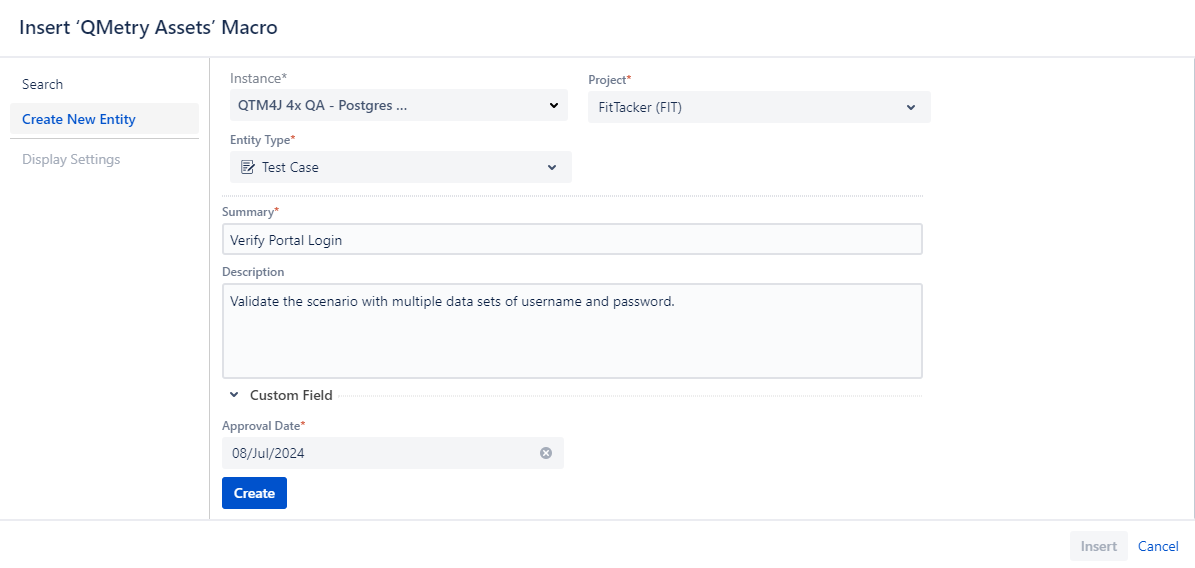
Then click the Insert button at the bottom.
QMetry Assets panel is inserted into Confluence with the selected test assets.
To view the asset added through the inserted macros, publish the Confluence page. You can view the newly added QMetry Assets from Confluence.
You can edit the inserted QMetry Assets macro. Refer to the Edit Inserted Macro section for more details.
Display Settings
The Display Settings section lets you configure the view of test assets on Confluence. You can set the preference as to how the test assets should appear on the page.
Note
The Display Settings section gets enabled only after you select a Project and Entity Type on the screen.
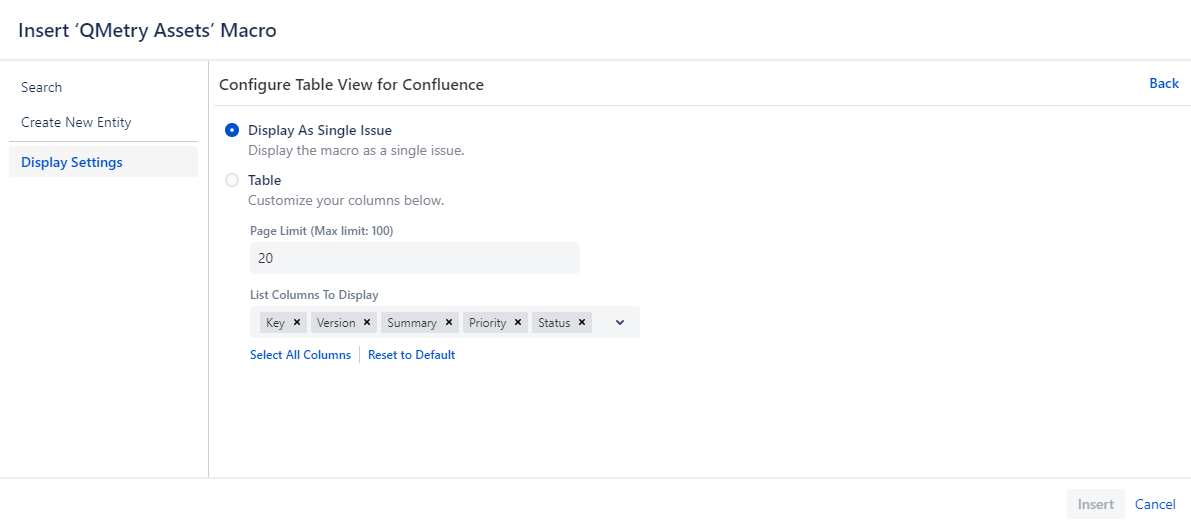
Display as a Single Issue: The option is enabled only if you have selected a single asset in the Search section on the Insert QMetry Assets Macro. Note that you can opt to display the selected test asset either as a single issue or in table format.
Update the Confluence page. The selected test asset will be displayed as an individual entity.
Display as Table: The selected test assets will be displayed as per the Table configuration done in this section.
Page Limit: Define the number of records that you want to display on a single page of the macro. You can define the pagination limit up to 100.
List Columns to Display: The field contains default columns selected on it to display on the page. You can add more columns using the drop-down menu or remove selected columns as per your preference. The list displays columns as per the selected Entity Type.
You can also Select All Columns to display on the page. If you want to get back to the default column selection, click on the Reset to Default option.
Update the Confluence page once you insert the Macro onto the page.
The table is generated in accordance with the display settings done for the table.
Editing Inserted Macros
You can edit the inserted QMetry Assets macro anytime on Confluence. Open the Confluence page in Edit mode.
Follow the steps mentioned below.
Click on the QMetry Assets macro panel inserted on the page. The Edit and Remove buttons become visible.
Click on the Edit button to make any changes to the panel.
Deselect the selected assets on the screen and you can then search required assets afresh.
Select the desired test assets and adjust the Display Settings if required.
Click Save to save your changes.
View QMetry Assets on a Published Page
When the Confluence page on which you have inserted the QMetry Assets macro is published, it displays test assets as per the applied selection criteria.
The panel has the following options on it.
A. Refresh Results to sync the test assets with QMetry Test Management for Jira.
B. Clickable Jira Issue Key to open the test asset detail page in QMetry Test Management for Jira.
C. Pagination to navigate across the pages.
D. Expand/Collapse toggle option to resize the panel and save space on the page.
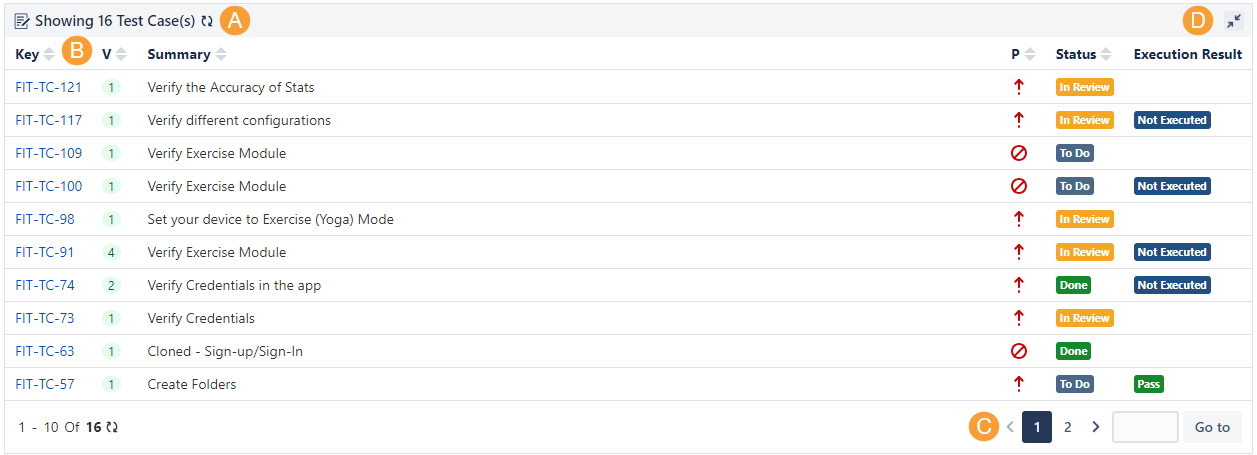
The following is an example for Test Plan.
The Count of Test Cycles associated with test plan and Execution Summary of all the test cycles linked to the test plan are displayed on the QMetry Assets macro.
Copy Confluence Pages with QMetry Assets Macro
The following points are applicable to the QTM4J Confluence Integration.
If you copy an existing Confluence page, which has QMetry Assets Macro embedded on it, the original page and copied page remain independent of each other.
Any changes done in the inserted QTM4J Macro in either of the pages reflect in the same page only i.e. the changes in QMetry Assets Macro in the original page do not impact the copied page and vice-a-versa.
Delete QTM4J Application Links from Confluence
Users can remove the linkage of QTM4J Application with Confluence if it is no more required.
Steps:
Open the Administration menu and open General configuration.
Then click on the Application Links on the navigation bar.
The Confluence administration screen opens.
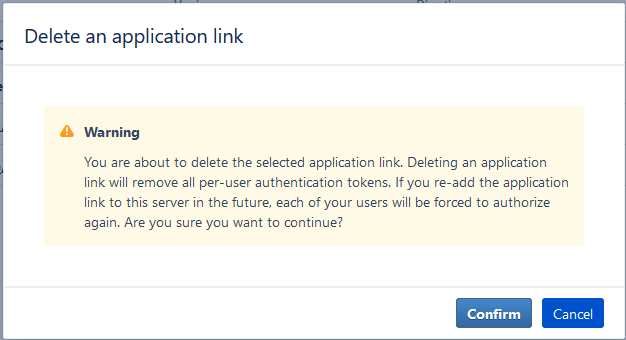
For the configured QTM4J Application link, click the More option and select Delete.
The Confirmation message appears.
Click Confirm to proceed.