Copy Custom Fields
You can copy custom fields of the Test Case, Test Cycle, Test Plan, and Test Execution modules to other modules of the current project and required modules of other projects.
Permissions required:
To copy fields to the current project: Configuration View and Configuration Modify permissions for the current project.
To copy fields to other projects: Configuration View and Configuration Modify permissions for both the source and destination projects.
Copy Custom Fields to Current Project
You can copy custom fields of one module to other modules in the same project. When custom fields with extensive list values exist in a project and are used in multiple modules, the copy feature helps users copy the custom fields with their values from one module to another in the same project. It simplifies the creation and configuration of custom fields, saving time and effort when consistent fields are needed across multiple modules.
Settings for mandatory fields and Default Custom Field Values are also copied from the source project to the destination project.
Perform the following steps to copy custom fields to the current project:
Go to Configuration and select Custom Fields.
Select the module section from the Test Case, Test Cycle, Test Plan, and Test Execution sections from which you want to copy the custom fields.
Select the custom fields that you want to copy to other modules of the current project.
Click Copy..
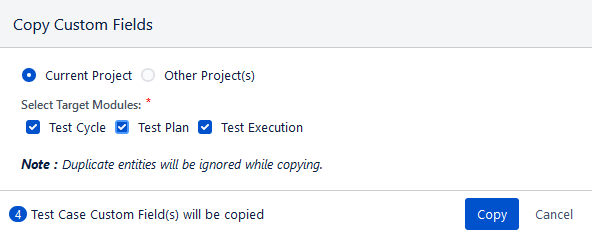
The Copy Custom Fields dialog appears.
You can copy the selected custom fields to Current Project or Other Project(s).
Select the Current Project option.
Select Target Modules: The section displays modules other than the module from which you selected the custom fields to copy. Select the target module where you want to copy the selected custom fields.
Click Copy.
The success message appears.
The selected custom fields are copied to the selected modules of the current project.
Copy Custom Fields to Other Projects
This feature enables users to copy custom fields from one QMetry project to another, allowing them to reuse configurations across projects. By eliminating the need to recreate custom fields individually, it saves time, ensures consistency, and prevents duplication.
The settings for mandatory fields and Default Custom Field Values also get copied from the source project to the destination project.
Perform the following steps to copy custom fields to other projects:
On the Custom Fields screen, select the module section from the Test Case, Test Cycle, Test Plan, and Test Execution sections from which you want to copy the custom fields.
Select the custom fields that you want to copy to other projects.
Click Copy.
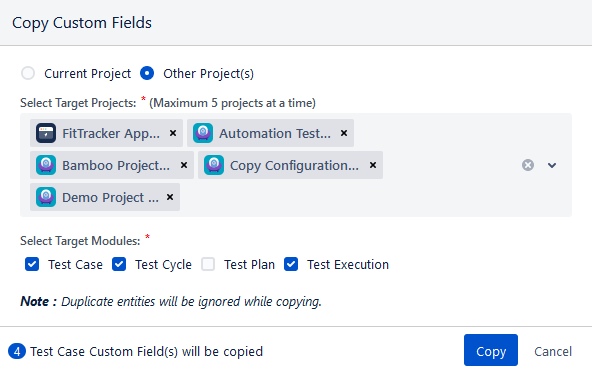
The Copy Custom Fields dialog appears.
You can copy the selected custom fields to Current Project or Other Project(s).
Select the Other Project(s) option.
Now select the project where you want to copy the selected custom fields. You can select multiple QMetry Projects (a maximum of five projects) at a time to copy the custom field.
Select the Target modules of the other projects in which you want to copy the selected custom fields of the current project.
Click the Copy button.
The success message appears.
Note
Duplicate entities are ignored during copying. If the selected fields already exist in the destination project, they are not copied.
The selected custom fields are copied to the selected modules of the other selected projects.
View Audit Logs
Source Project - The Copy Custom Fields activities are captured in the source project's Audit Log.
Destination Project - The Copy Custom Fields activities are captured in the destination project's Audit Log.
View Progress
You can track the progress of copying custom fields in the same project or across projects from the Notification section. Use the Bell icon to access View Background Processes and monitor progress.
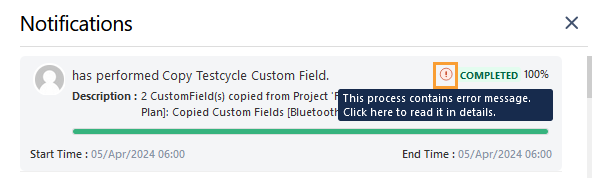
Completed: When the custom fields are copied, the Notification section displays a Completed status for the operation.
Completed with Errors: If the custom fields are partially copied, the Notification section displays a Completed status along with an error message. Click the error icon to view the details.