Build
Users can create builds in Configuration, which will then appear on the drop-down list on the execution screen. The functionality is helpful to users as it saves users' time and effort required in typing the build name repeatedly. Also, typing the same build name repeatedly may also induce typo errors.
Note
Required Permissions:
Jira Permissions: Browse Project permissions are required.
QMetry Permissions: If enabled, then the following permissions are required.
Configuration View
Configuration Modify
Create a Build
You must have the Configuration Modify access to the project for creating Builds.
Perform the following steps to create builds:
Go to the QMetry menu and select Configuration.
Under Test Execution, select Build.
Enter a Build name and its Description. Then click Add.
Add Build Values Inline
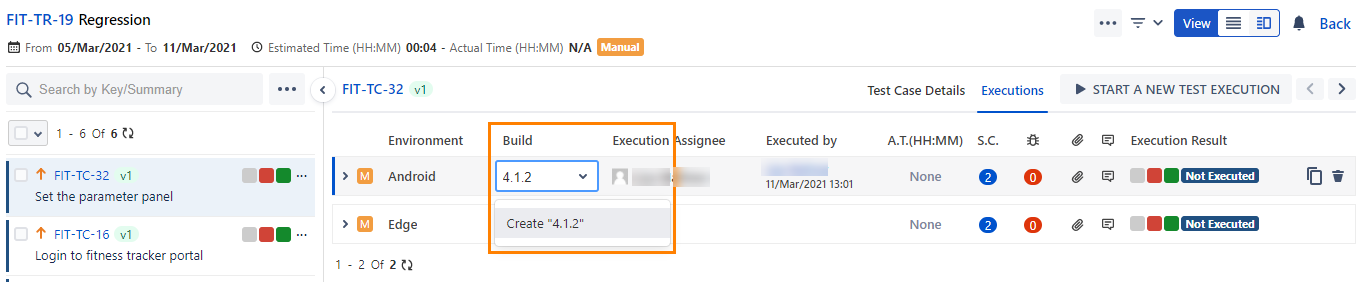
The Build field values can be added inline in the test asset detail page. For example, a Build value "4.0.6" is added in the test case detail page.
In the Build field, type the field value.
An option to create the value is prompted. Click it or press ENTER.
Edit a Build
You must have the Configuration Modify access to the project to edit a created build.
Perform the following steps to edit a build:
Click the build, and a text box appears to enter the new build name.
After typing the new name, click the tick mark symbol. Also, editing the description field can be done on similar lines.
Copy Build to Other QMetry Projects
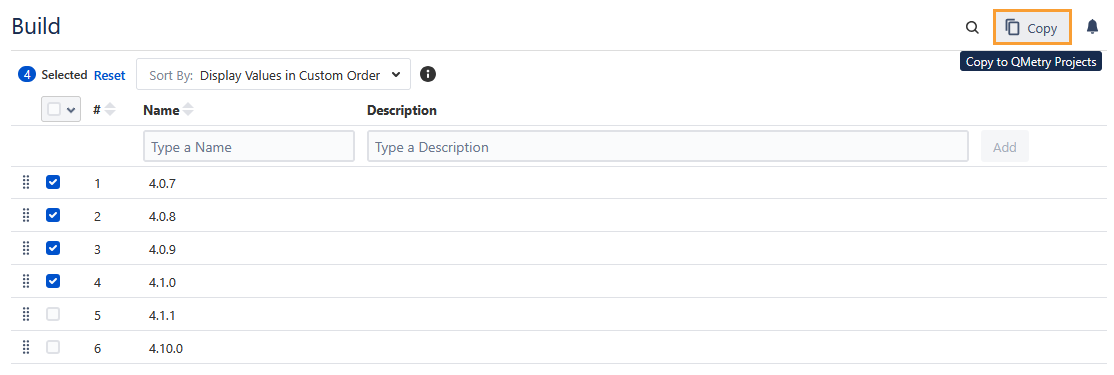
You can copy Builds from one project to other project, which saves time in creating duplicates for different projects. The functionality allows users to use similar items in different QMetry projects without having to add these items individually.
Select the items that you want to copy to other QMetry Projects and click Copy.
Select the project where you want to copy the selected items. You can select multiple QMetry Projects (a maximum of five projects) at a time to copy an item.
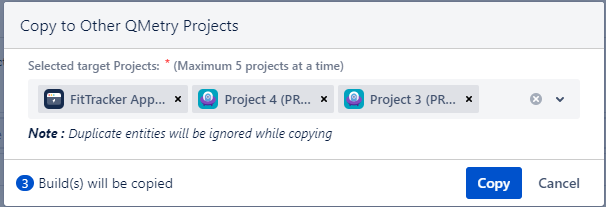
Duplicate entities will be ignored while copying.
Delete a Build
You can also delete a build that is no longer required. Once a build is deleted, all its associations will be removed.
Permission required: You must have the Configuration Modify permission to the project to delete a build that is no longer in use.
Perform the following steps to delete a build:
Go to the QMetry menu and select Configuration.
Under Test Execution, select Build. The build's list is displayed on the screen.
Click the Delete icon of the build that you want to delete.
If a build is used in a test case execution, it cannot be deleted. An error will be displayed for the same.
Search for a Build
The Searching feature helps you locate the required build easily, even if it is a long list of builds on the screen. You can also search for a build before creating a new one to avoid duplication.
Perform the following steps to search for a build:
Navigate to QMetry, select the Configuration menu, and select your project.
Click Build under Test Execution.
Click the search icon to see the text box. Type the keyword in the text box and press ENTER on the keyboard.