Audit logs
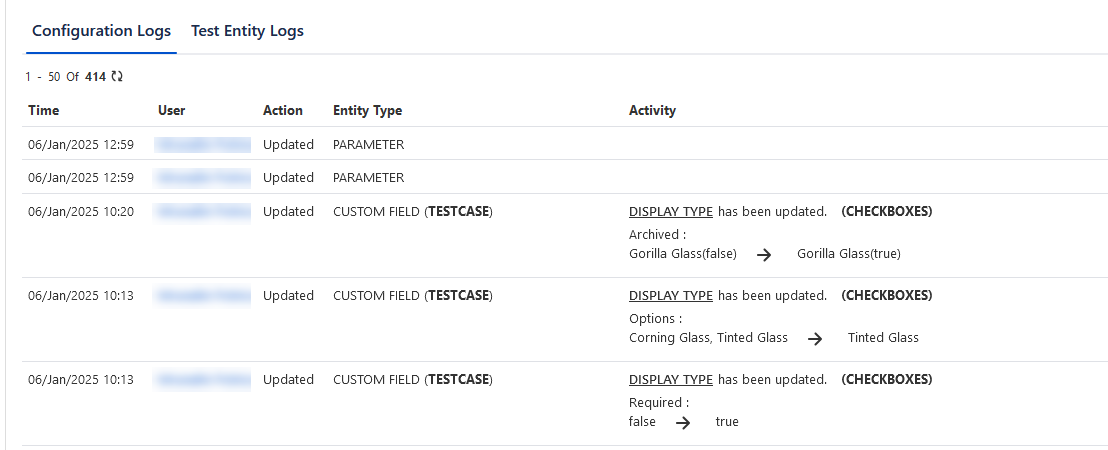
There are two tabs to categorize the logs: (A) Configuration Logs and (B) Test Entity Logs.
(A) Configuration Logs: This tab displays Audit Logs related to all the sections under the Configuration menu.
Permissions required: You must have the Configuration View permissions to view the Configuration Logs.
The Audit Logs display the following details:
Time: The date and time on which the action was taken. The date/time is shown as per the timezone set in the user profile.
User: The user who has performed the action.
Action: The action that is carried out on the field.
Entity Type: It refers to the sections under the Configuration menu. When any action is performed in the sections, it is listed in the logs.
Activity: The column describes what action has been performed for the test entity value that was changed/updated (Old Value →New Value).
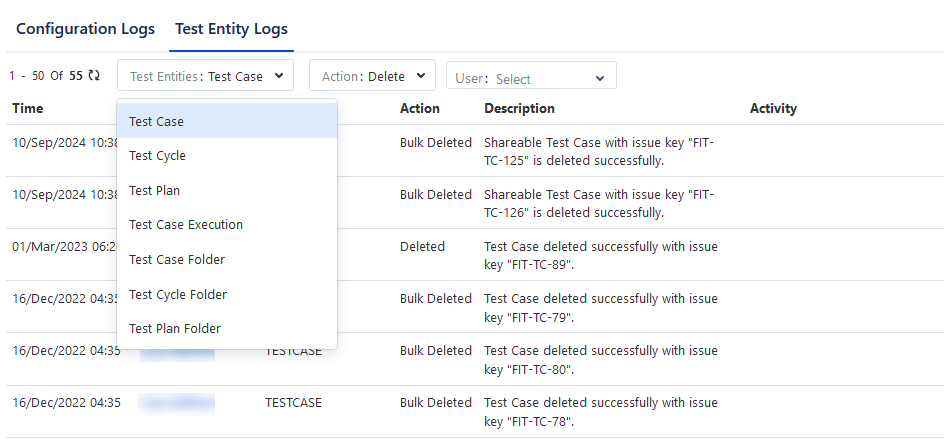
(B) Test Entity Logs: This tab displays Audit Logs related to test entities and their folders.
Permissions required: Jira project admin with the Configuration View permissions can access the Test Entity Logs.
The following logs are captured in the Test Entity Logs.
Deletion actions for all test assets.
All operations on folders.
Export & Import of test cases and executions.
You can filter the Audit Log records on Test Entities, Action, and User.
Test Entities: Select from the following test entities.
Test Case
Test Cycle
Test Plan
Test Execution
Test Case Folder
Test Cycle Folder
Test Plan Folder
Action: The list of Actions populates according to the selection of the Test Entities option, like Delete, Import, Export, Create, Update, Move, Copy, and so on.
User: Select the user on the drop-down to filter out the actions performed by the user for the selected Test Entity and Action.
The Audit Logs display the following details:
Time: The date and time on which the action was taken. The date/time is shown as per the time zone set in the user profile.
User: The user who has performed the action.
Entity Type: Entity Type selected in the filter.
Action: The action that is carried out for the entities.
Description: Description regarding the action.
Activity: The value that was changed/updated (Old Value →New Value).