QMetry Permissions for Project
Administrators can enable QMetry permissions to manage user access for different modules like Test Case, Test Cycle, Test Plan, Configuration, Exploratory Testing, Import, Export, and so on.
The QMetry permissions for the project are disabled by default. All the users who can view the project will be able to perform any operations in QMetry for that project. After enabling permissions, all permissions are assigned to All Users by default. Permissions can be assigned to users, groups, or everyone.
Note
Required Permission:
Jira users with the Administer Project and Browse Projects permissions for the project can configure QMetry permissions for that project.
Users should be part of the group added to Global Settings > QTM4J Project Settings.
Steps to Enable QMetry Permissions
Perform the following steps to enable QMetry Permissions:
From the Projects drop-down list on the Jira main menu, select the project for which you want to enable the QMetry Permissions.
Click the Project Settings on the navigation bar.
On the Project settings page, click QMetry Permissions on the navigation bar.
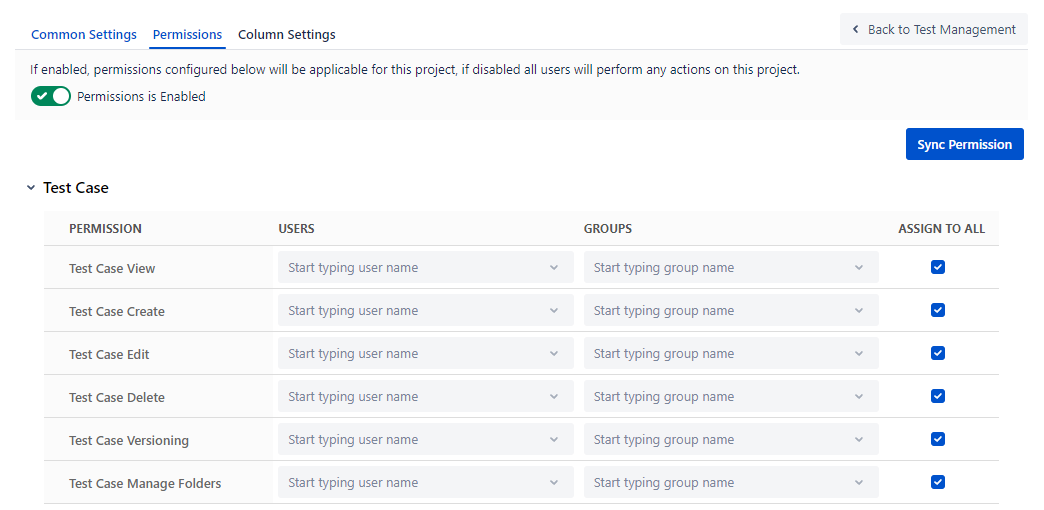
On the Permissions screen, enable the Permissions on the Permission tab to enable configuration setup for different modules. The Permissions flag remains disabled by default.
Once the Administrators enable the Permissions option, the screen displays Module-wise permissions.
The permissions are assigned to all by default.
Module-wise Permissions
Administrators can assign Module-wise permissions to users and groups. Refer to the following table for the description of permissions:
Permissions | Implications |
View | It allows users to view the module. |
Create | It allows users to create new records for the module. |
Edit | It allows users to update the details of the module. |
Delete | It allows users to delete the records of the module. |
Test Cycle Execute | It allows users to execute the Test cycle. |
Import | It allows users to import test cases. |
Export | It allows users to export entities like test cases. |
Versioning | It allows users to create and manage versions of the Test Case. |
Manage Folders | It allows users to create and manage folders of the Test Case, Test cycle, and Test Plan. |
Test Case
The testers in the team require test case permissions to perform the operations related to test cases.
Note
In the case of Automation, users with Test Cycle Create rights can create test cases through automation even if they do not have Create rights for the Test Cases.
Test Cycle
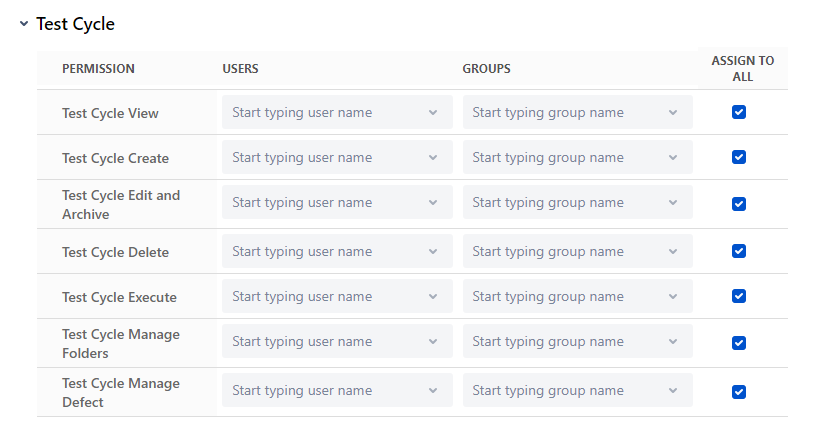
The testers who are executing test cases require Test Cycle permissions.
Note
In the case of Automation, users with Test Cycle Create rights can create test cases through automation even if they do not have Create rights for Test Case.
Test Cycle Execute: This permission allows users to perform all execution operations (except create, link and unlink defects for test cases and steps) on the execution screen, test case and story sections.
Test Cycle Manage Defect: This permission allows users to create, link and unlink defects for test cases and steps on the execution screen irrespective of the Test Cycle Execute permission.
Existing users or groups with the "Test Cycle Execute" rights have the “Test Cycle Manage Defect” permission granted by default.
For new projects, the “Test Cycle Manage Defect” permission is assigned to all by default.
Users without the “Test Cycle Manage Defect” permission will not be able to perform the following operations:
Create Bug/Sub-Task, Link Existing Bug, and Unlink Existing Bug tasks at test case and test step level.
Copy Defects while cloning test cycle in current project.
Clone existing test execution. Users can only clone an existing test execution if they have both "Test Cycle Manage Defect" and the "Test Cycle Execute" permissions.
Test Plan
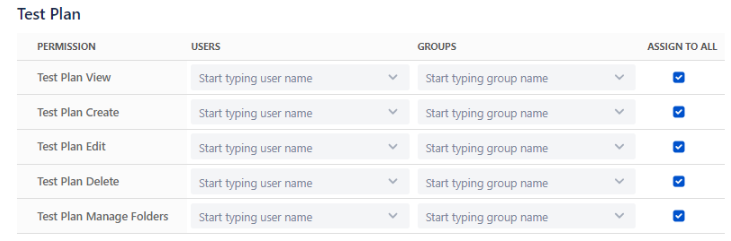
QA Managers require Test Plan permissions to perform the operations on Test Plans.
Configuration
If the user has View rights for Configuration, then they can only view the Configuration settings of the project. The user can also generate the Open API key and the Automation API key.
If the user has Modify rights, then they can change the Configuration. For example, Add, Edit, Delete custom fields, labels, components, execution results, updating preferences, and so on.
Exploratory Testing
The testers and Business Analysts in the team require Exploratory Testing permissions.

Report
QA Managers require Report permission.

Requirement
The testers and Business Analysts require the Requirement permission.
If the user has Edit rights of the Requirement, then they can link or unlink test cases with the story. If the user has View rights, then they can only view the linkages.
Defect
QA and Development teams require Defect permission.
Defect Traceability when the user has the View rights: The user can view the linkages of the test cases with Story issue, the associated bug on the Test Cycle Execution screen and view the Bug detail page in Jira.
Defect Traceability when the user does not have View rights: The user can view the associated bug on the Test Cycle Execution screen but they can not view the Bug traceability panel details on the Jira issue page.
Import - Export
The testers in the team require Import and Export permissions to import and export test cases.
Important
Import Test Case: If users want to import test cases, all rights under Test Case and Configuration sections should be enabled, along with Import permissions.
Provide Export access if the user wants to export test assets into an Excel sheet.

JQL Function
Users can query Jira stories and bugs linked to Test Cases, Test Cycles, and Test Executions. The Execute QMetry JQL Functions permission allows users to execute QMetry JQL functions in Jira.
Manage CI/CD Rules
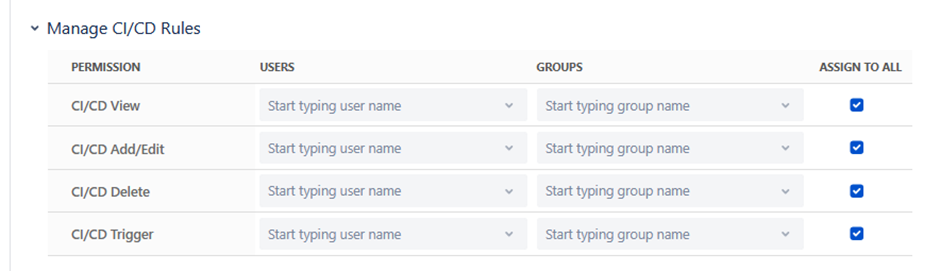
The Manage CI/CD Rules permission enables authorized users to configure CI/CD rules and manage pipeline jobs. This helps enforce governance and minimizes the risk of unauthorized access to sensitive data.
Changing the Default "Assign to All" Permission
By default, all users will have the respective permissions when the Assign to All option is selected.
To edit a permission, remove the Assign to All checkbox selection. The permission record appears in editable mode.
To grant permissions to the users, open the Users drop-down list and select the users.
To grant permissions to the groups, open the Groups drop-down list and select the groups.
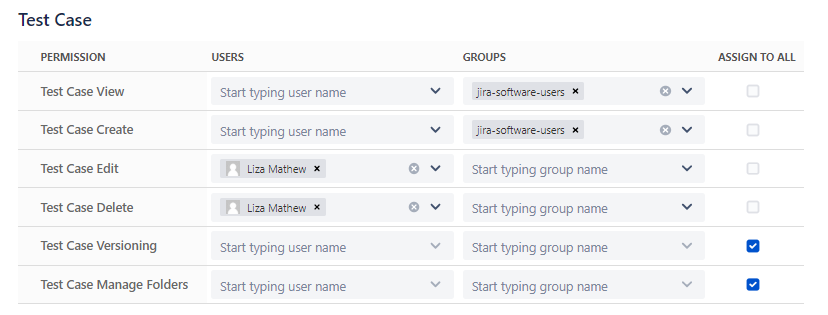
This way, you can add or edit permissions to users or groups for each module.
Syncing Permissions
Sync Permissions with Jira Permissions and Jira User Groups:
The changes made in Jira permissions, Jira users, and Jira user groups do not sync immediately in QMetry.
The Sync Permission will sync these permissions for the following actions:
Addition or Removal of Jira permission. For example, the Browse Project.
Addition of users in Jira Groups
Removal of users from Jira Groups
Deletion of Jira Groups
Deletion of the user
Users' permissions in the group in QMetry for the Jira plugin will be impacted only after syncing the permissions.
View the Progress of Permission Sync
To view the status of the background process of syncing permissions, click the Bell icon at the top.
The Notifications pane appears. It displays the progress of the sync process.