Enable QMetry Features for Jira Project
The following settings are part of Common Settings under Project Settings.
Configure QMetry for Jira
Note
The following settings are mandatory to start working on QMetry Test Management for Jira.
Perform the following steps to configure QMetry for Jira:
Click the Projects drop-down list on the main menu and select the project to which you want to apply the QMetry settings.
Click the Project Settings at the bottom left of the navigation bar.
On the Project settings page, click the QTM4J Settings at the bottom left of the navigation bar.
On the screen at right, enable QMetry For Jira on the Common Settings tab to start managing test cases.

Once you enable the QMetry For Jira option, you can view QMetry for Jira features in the project.
Enable Issue Types for Story and Bug
The section becomes visible as soon as you enable the QMetry For Jira option. You can configure Story and Bug Issue Types for particular issue types in Jira. Selected issue types will be considered as Story/Bug.
For example, Story and Epic are enabled as Story issue types in Jira, so issues of these types can be linked as Story in QMetry for Jira. In the same way, you can enable issue types for Bug.
This configuration at the Issue Type level is applicable to a particular project in Jira.
Note
Jira users with the Administer Project and Browse Projects permissions for the project can access QMetry Project Settings and configure QMetry for Jira features at the Issue Type level.
To display issue types in the Story and Bug tabs, QMetry Test Management for Jira uses one of the Jira APIs. This Jira API requires the "Create Issues" permission in Jira for that particular project.
If enabled, the QMetry for Jira features will be available to use with that particular Issue Type in Jira. The Test Case/Acceptance Criteria pane will be visible below the Description section.
Perform the following steps to configure the issue type for Story or Bug:
Click the Projects drop-down on the main menu and select the Project to which you want to apply the QMetry settings.
Click the Project Settings at the bottom left of the navigation bar.
On the Project settings page, click the QTM4J Settings at the bottom left of the navigation bar.
On the screen at right, enable QMetry For Jira to start managing test cases.
The section becomes visible once you enable the QMetry For Jira option. You can enable/disable Story and Bug Issue Types for particular issue types in Jira.
This configuration at the Issue Type level applies to a particular project in Jira.
There are three tabs: Issue Type, BDD, and Email Notification.
On the Issue Type tab, there are two sections: Story and Bug.
Enable Issue Types as Story
You can link only those issue types as Story that are enabled here. QMetry 'Test Case/Acceptance Criteria' panel will be available for enabled issue types only.
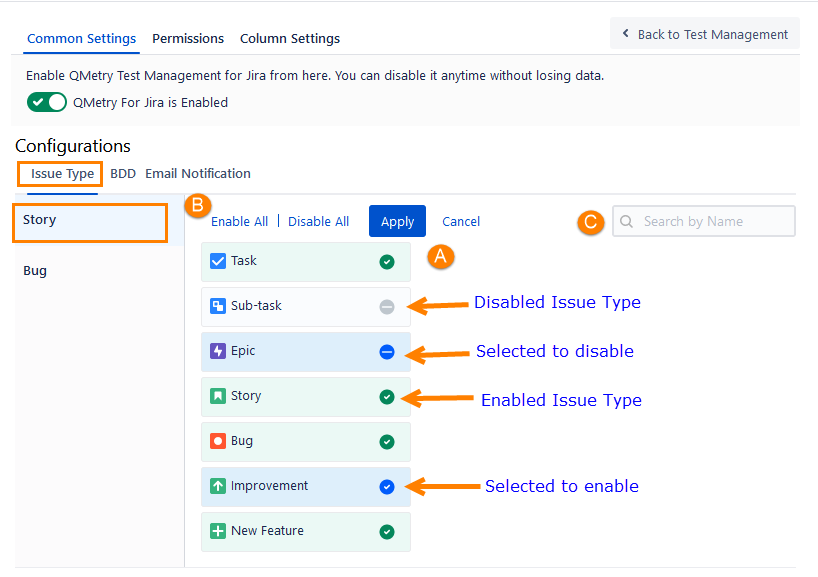
By default, all issue types will be enabled. Select the issue types that you want to disable for Story and click the Apply Changes button.
Note
Only enabled issue types will be allowed to link as a Story.
QMetry Test Case/Acceptance Criteria panel will be shown for Jira issue pages with enabled issue types only.
A. You can select individual issue types by clicking on the adjacent icon.
B. Select/deselect all issue types at once by clicking on Enable All/Disable All option.
C. If there is a long list of issue types, you can also search for a specific issue type with the help of a search box.
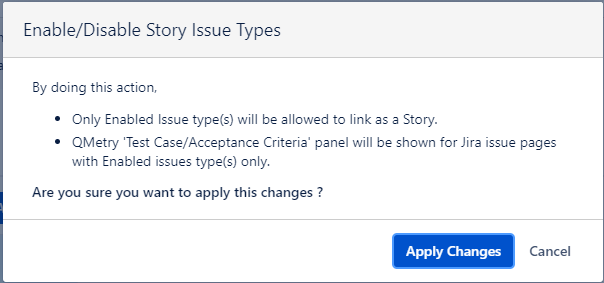
The confirmation message pops up.
Click the Apply Changes button to proceed.
Once enabled, the QMetry for Jira features will be available to use in the corresponding issue types in Jira. The Test Case/Acceptance Criteria panel is displayed below the Description section.
Enable Issue Types as Bug
You can link only those issue types as Bug that are enabled here. QMetry Bug Traceability pane will be available for enabled issue types only.
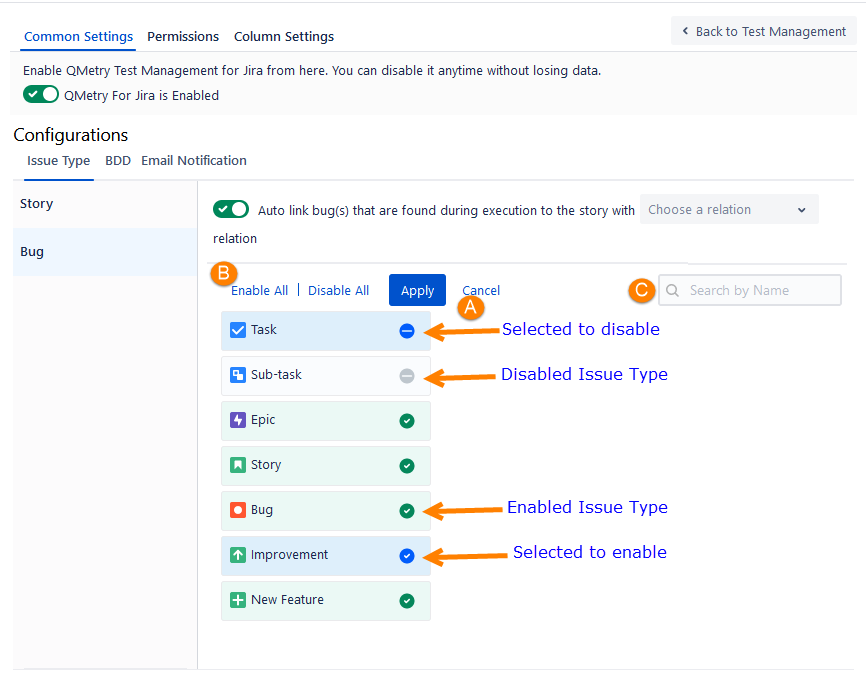
By default, all issue types will be enabled. Select the issue type(s) that you want to disable for Bug and click the Apply Changes button.
Note
Only enabled issue types will be allowed to link as a Bug.
QMetry Bug Traceability/Test Case panel will be shown for Jira issue pages with enabled issue types only.
A. You can select individual issue types by clicking on the adjacent icon.
B. Select/deselect all issue types at once by clicking on Enable All/Disable All option.
C. If there is a long list of issue types, you can also search for a specific issue type with the help of a search box.
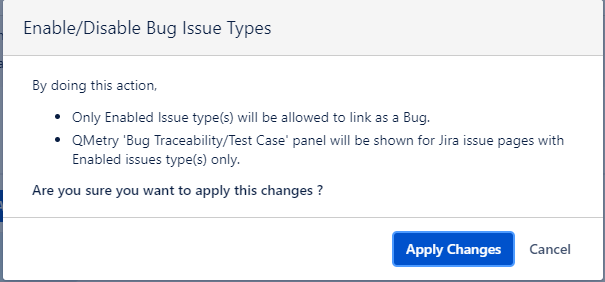
The confirmation message pops up. Click the Apply Changes button to proceed.
Defect Traceability in Jira
Issue Types that are enabled as Bug issue types from Project Settings will be considered as Bugs. The Bug Traceability panel is available for all such issue types that are enabled as Bug.
On the Bug Traceability panel, you can view the details of the test cycles and test cases for which the bug is logged. Refer to Defect Traceability in Jira for more details.
Disable Issue Types for Story and Bug
The screen displays the list of Issue Types with flags indicating whether the QMetry for Jira features are “Enabled” or “Disabled” for each Issue Type. It is a toggle option to enable or disable the feature.
If you disable the issue type for Story/Bug, users will not be allowed to link the disabled issue type as Story/Bug. The QMetry for Jira features will not be available for that particular Issue Type in Jira.
To disable the QMetry for Jira Features for a particular Issue Type, click on the enabled icon and click on the Apply Changes button. To disable all the enabled issue types, click the Disable All option and click the Apply Changes button. The confirmation message pops up.
Click the Disable button after reading the message. The QMetry for Jira Features are turned off for the Issue Type.
The Test Case/Acceptance Criteria panel will not be visible below the Description section in Jira.
If the Issue Type is Bug, then the Traceability tab will not be available in Jira.
Auto-link Execution Bugs to Stories
An administrator can configure the option to auto-link bug(s) that are found during execution to the story with a specific relation. If the option is enabled, bugs logged to a test case execution get automatically linked to the Jira story associated with the corresponding test case. You can view the bugs in the Linked Issues section of the Jira story, as defined by the relation in the configuration in the Project Settings configuration.
For example, it is customary for the QA team and Managers to thoroughly assess all the bugs associated with the executed stories and ascertain the resolution while marking the Story progress as Done. To facilitate this, it is of utmost importance to establish bug traceability for the stories identified during execution, allowing all QA teams to review them during sprint closure or triage discussions.
Once the settings are switched on, the newly created/linked bugs will be associated with the story.
Permissions required: The following Jira permissions are required:
Browse project permission
Link issues permission
Note
Admin can configure settings to enable/disable auto-linking of bugs to the story. The option remains enabled by default for new projects.
Admin can also choose the relation of the bug to the Jira Story. The default relation is “Relates to”.
If the same bug is logged from different test cases that are linked to the same story, the bug will be linked only once to the story under one relationship. If the relation is changed under the Auto link configuration in Project Settings, then the bugs logged after that will be linked to the story under that changed relation.
If an individual bug is linked with the test case execution and test step execution, the bug will be linked only once to the story.
If a bug is unlinked from the test case/test step execution or the test case association with the story is removed afterward, the bug linkage with the Jira story will remain as it is.
The Linked Issues section on the Jira Story detail page displays the bugs logged while execution.