BDD in QMetry Test Management for Jira (QTM4J)
Overview
Configure BDD in QMetry Test Management for Jira
GitHub Integration
GitLab Integration
Bitbucket Integration
Enable BDD Panel in Jira Story
BDD Code in Jira Story
Write Code and Push it to Repository
Pull Code from Repository
BDD Code Execution
Quick Options on BDD Panel
Overview
Enterprise teams practicing Behavior-Driven Development (BDD) can author, store and sync feature files directly to/from Version Control Systems (VCS) like BitBucket, GitHub, and GitLab using the Gherkin editor in Jira stories. The two-way syncing between QMetry Test Management for Jira & VCS keeps developers, testers and product owners up-to-date with the latest source code change commits.
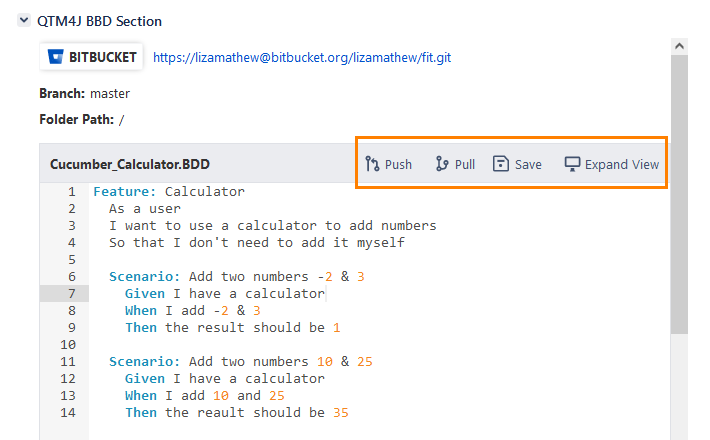
BDD editor is provided on the Jira Story issue page, where Business Analysts/Automation testers can write down acceptance criteria in the Gherkin language.
The BDD panel is available to all issue types which are configured as a Story in QMetry Project Settings.
Supported Version Control Systems are Github/Gitlabs/BitBucket - Cloud & Self-hosted (Server/On-premise).
Testers can push as well as pull the BDD content to/from the repository through the BDD editor if the version control system is configured with QMetry Test Management for Jira project.
Project Administrator can turn off the BDD panel afterward if it is not required on a given project.
Pre-requisites
Users should have the following rights in QMetry Test Management for Jira:
Project administrator rights
Configuration View and Modify permissions
Requirement View and Edit permissions
To write the BDD Code on the issue page -
The Jira issue type should have been mapped as Story in QMetry Project Settings.
Configure BDD in QMetry Test Management for Jira
Steps
Follow the steps described below to configure BDD in QMetry Test Management for Jira.
1. Open the project and go to Projects Settings.
 |