Test using QMetry Automation Framework
Import Test Results generated from .feature file
Sample Test Result File
Test Case Reusability and Story Association
Import Test Results generated from .bdd file
Execution Attachments
Introduction
QMetry Automation Framework is designed to solve common industry problems related to testing complex web systems. The framework is best suited for writing Automated Web, Mobile Web, and Mobile Native Application UI Tests to simulate real user activities on the page. The framework is built upon Java and integrates TestNG, Selenium/Webdriver, Appium, and Perfecto.
Due to the framework’s thorough design, the test developer does not need to worry about common tasks such as thread-safe browser sessions for running tests in parallel, reporting, or incorporating results with test management tools. The test run can be configured through standard testing configuration files, and the test run filters, and behavior can be changed within the config File.
Import Test Results generated from .feature file
Here is how you can specify the Test Cases and Test Steps in .feature file -
Test Case Tag | Test Step Tag |
|---|---|
Scenario > name | Statement with Given, When, Then keyword |
QMetry uses the following tags of the QAF output result file to create Test cases and Steps.
Test Case Tag | Test Step Tag |
|---|---|
Meta-info.json > metaData> methods > name | checkPoints > message |
Supported file types : ZIP
The following feature file shows the syntax for story association and test case reusability.
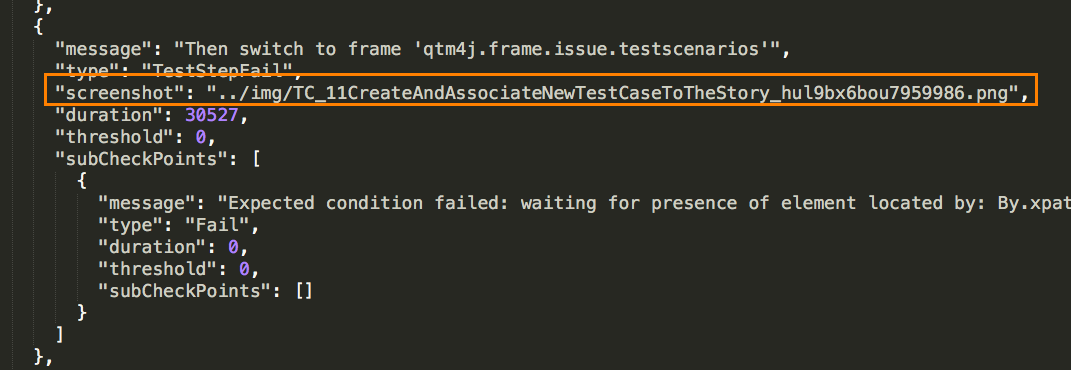 |
The relative path of screenshots will be referred from "checkpoints > screenshots" to find the attachment at the relative path in the zip file that is being uploaded.
For example: If the screenshot path is ../img/TC_11.png, then the file name with TC_11.png needs to be available in img folder in the zip file at the root level.